

12-Amethyst
September 24, 2020
Solved

Play and previous buttons are not working

  • September 24, 2020
  • 2 replies
  • 4461 views

Hi,

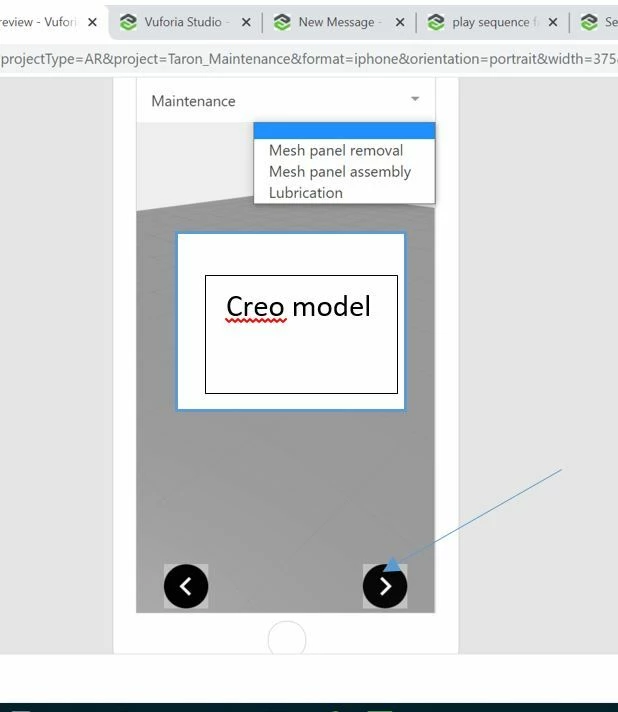
I created a 3 figures in creo illustrator and imported into Vuforia studio. In 2D canvas drag and drop the select widget for creating a list of figures. Below i have attached the code which i used to create a list. List and 3D images are working fine. But I'm unable to play the animation of the sequences.
2_testing.JPG


How to add the buttons to play the animation?. kindly guide me. 


// create a list of identifiers and descriptions for the 'select list' widget
var stepListJSON;

PopulateStepList = function() { 

	stepListJSON=[

 {
 stepID: "Mesh panel removal",
 stepTitle: "Mesh panel removal",
 stepNum: 1
 },
 {
 stepID: "Mesh panel assembly",
 stepTitle: "Mesh panel assembly",
 stepNum: 2
 },
 {
 stepID: "Lubrication",
 stepTitle: "Lubrication",
 stepNum: 3
 },
 
 ];
 
 console.log(stepListJSON);
	$scope.view.wdg.stepList.list= stepListJSON; 
}

//when the model is loaded, execute the following function(s) - view action binding in the 'Model Loaded' JS property window of the 'model-1' widget
$scope.startup = function () {
 PopulateStepList(); 
}

GetStepNumberID = function (stepID) {
 
 var numberID = "UNKNOWN_ID";

 Object.keys(stepListJSON).forEach(function(item){
 
 if (stepListJSON[item].stepID == stepID) {
 numberID = stepListJSON[item].stepNum;
 }

 });
 
 return numberID;
 
}

//evaluate selected step to determine image visibility
$scope.evaluateStep = function () {

var selectedValue = $scope.view.wdg["stepList"]['value'];
var stepNumber = GetStepNumberID(selectedValue);

 if (stepNumber == 3){
 $scope.view.wdg['3DImage-1']['visible']=true;
 } else {
 $scope.view.wdg['3DImage-1']['visible']=false;
 }
}
 

 @ssam @GI_317594 @awexvuforia 

Best answer by TM_9260611

@sebben @RolandRaytchev 


Hi Both, Successfully i got an output as per my expectation. Small update is required. The 3D label is appearing when model is loaded. which means, when sequence is empty, 3D image is appearing. how to avoid that?. I want that 3D image have to load after selecting Lubrication optionI want that 3D image have to load after selecting Lubrication option


$scope.checkSequence = function(){
 $timeout(function () {
 if( $scope.view.wdg['model-1']['sequence'] == 'l-Creo 3D - Lubrication.pvi')
 $scope.setWidgetProp("3DImage-1", 'visible', true); 
 else
 $scope.setWidgetProp("3DImage-1", 'visible', false);
 $scope.$applyAsync(); 
 	},50);
}


2 replies

21-Topaz I
September 24, 2020

Hi @TM_9260611 ,

without looking more deeply in your code I think that what you want is a functionality calling  playing a step for  pvz name a step number. I used in the past the following function which was working fine on android and IOS (there I tested it):


//////////////
//definition of the function HOLO
$scope.app.playModelStepPvz = function (pvz,sequence,modelName,step_number,play) {
 //pvz file
 //sequnece -sequnece name e.g. TestFigure1 - as shown in UI;
 
//modelName - model name e.g. model-1 widget
//step_number - set this number to current step
//play true/false execute play for the model
 $scope.$applyAsync(()=>{$scope.setWidgetProp(modelName, 'src', '');}); 

 
 $timeout(function () {
 $scope.$applyAsync(()=>{$scope.setWidgetProp(modelName, 'src', 'resources/Uploaded/'+pvz);}); 
 
 },50);
 
 
 $scope.setWidgetProp('spinner-1', 'visible', true);$scope.$applyAsync();
 $timeout(function () {
 $scope.$applyAsync(()=>{$scope.setWidgetProp(modelName, 'sequence', '');});
 
 },50);

 $scope.setWidgetProp('spinner-1', 'visible', true);$scope.$applyAsync();
 $timeout(function () {
 $scope.$applyAsync(()=>{$scope.setWidgetProp(modelName, 'sequence', 'app/resources/Uploaded/l-Creo 3D - '+sequence +'.pvi');}); 
 
 },50);

 $timeout(function () {
 
 $scope.$applyAsync(()=>{$scope.setWidgetProp(modelName, 'currentStep', parseInt(step_number));});
 
 if(play) //check if play should be applyed
 
 $timeout(function () {angular.element(document.getElementById(modelName)).scope().play(); }, 100)
 //angular.element(document.getElementById(modelName)).scope().play(); }, 100);
 }
 , 500);


};


So for example you can use some property to save the current pvz (selected pvz)  if you have many - then the current figure /sequence and the current step number and call the function:


$scope.app.playModelStepPvz = function (pvz,sequence,modelName,step_number,play) ;
 //pvz file
 //sequnece -sequnece name e.g. TestFigure1 - as shown in UI;
 
//modelName - model name e.g. model-1 widget
//step_number - set this number to current step
//play true/false execute play for the model


or you can omit the pvz argument and use it without the pvz something like:


...
$scope.app.playModelStep($scope.view.wdg['select-1']['value'],modelWdgName,data.stepNumber,true);
...
//where 
//definition of the function 
$scope.app.playModelStepPvz = function (pvz,sequence,modelName,step_number,play) {
 //pvz file
 //sequnece -sequnece name e.g. TestFigure1 - as shown in UI;
 
//modelName - model name e.g. model-1 widget
//step_number - set this number to current step
//play true/false execute play for the model
 $scope.setWidgetProp('spinner-1', 'visible', true);$scope.$applyAsync();
 $scope.$applyAsync(()=>{$scope.setWidgetProp(modelName, 'src', '');}); 

 
 $timeout(function () {
 $scope.$applyAsync(()=>{$scope.setWidgetProp(modelName, 'src', 'resources/Uploaded/'+pvz);}); 
 
 },50);
 
 
 $scope.setWidgetProp('spinner-1', 'visible', true);$scope.$applyAsync();
 $timeout(function () {
 $scope.$applyAsync(()=>{$scope.setWidgetProp(modelName, 'sequence', '');});
 
 },50);

 $scope.setWidgetProp('spinner-1', 'visible', true);$scope.$applyAsync();
 $timeout(function () {
 $scope.$applyAsync(()=>{$scope.setWidgetProp(modelName, 'sequence', 'app/resources/Uploaded/l-Creo 3D - '+sequence +'.pvi');}); 
 
 },50);

 $timeout(function () {
 
 $scope.$applyAsync(()=>{$scope.setWidgetProp(modelName, 'currentStep', parseInt(step_number));});
 
 if(play) //check if play should be applyed
 
 $timeout(function () {angular.element(document.getElementById(modelName)).scope().play(); }, 100)
 //angular.element(document.getElementById(modelName)).scope().play(); }, 100);
 }
 , 500);

};


21-Topaz I
September 24, 2020

here I want to provide a demo project which is similar to this what you obviosly want to achieve but with some differences:

2020-09-24_12-47-43.jpg

So here we can play for the selected figure (1 or 2) the specific step number by clicking of the step number field - item s of list widget:

2020-09-24_12-49-57.jpg

Here also attached the demo project.

14-Alexandrite
September 24, 2020

Hi, 

It looks like the value of the model's sequence property is never set.

But if I understand you right, you only want to select a sequence from your list and play the sequence.

I think you can simplify this by doing the following:

  1. Bind the sequence list property of your model to the list property of your select widget
  2. Bind the value property of the select widget to the sequence property of the model
  3. Bind the click event of the "PlayButton" to the play service of the model
  4. Bind the click event of the "PreviousButton" to the rewind service of the model

Now you only need a function to show and hide the 3DImage if the Lubrication is the current sequence for example like this:

$scope.checkSequence = function(){
 $timeout(function () {
 if( $scope.view.wdg['model']['sequence'] == 'l-Creo 3D - Lubrication.pvi')
 $scope.view.wdg["3DImage-1"].visible = true;
 else
 $scope.view.wdg["3DImage-1"].visible = false; 
 	},50);
}

You can call this in the value changed event of the select widget.

12-Amethyst
September 24, 2020

Hi @sebben 


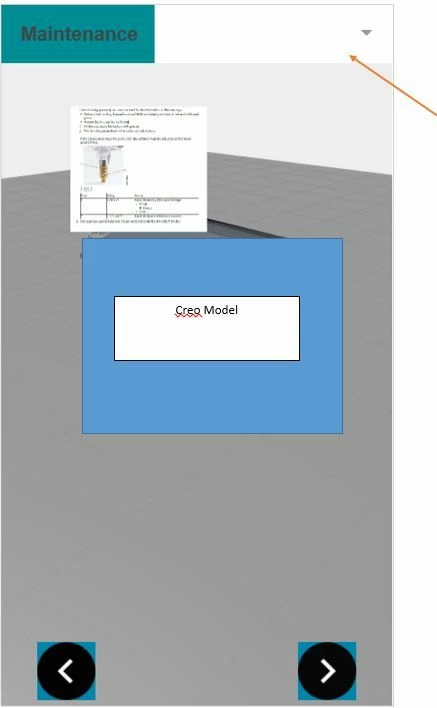
Thanks for the exact understanding of my requirement. I tried , the animation is working fine but the 3D-image still appearing to all the sequences. Below screenshot for your reference. I used same script for this model.

1.JPG2.JPG


$scope.checkSequence = function(){
 $timeout(function () {
 if( $scope.view.wdg['model']['sequence'] == 'l-Creo 3D - Lubrication.pvi')
 $scope.view.wdg["3DImage-1"].visible = true;
 else
 $scope.view.wdg["3DImage-1"].visible = false; 
 	},50);
}


@sebben 

21-Topaz I
September 24, 2020

add 


$scope.$applyAsync();


after setting the property  e.g. 


$scope.checkSequence = function(){
 $timeout(function () {
 if( $scope.view.wdg['model-1']['sequence'] == 'l-Creo 3D - Lubrication.pvi')
 $scope.view.wdg["3DImage-1"].visible = true; 
 else
 $scope.view.wdg["3DImage-1"].visible = false; 
 $scope.$applyAsync(); 
 	},50);
}