

1-Visitor
March 13, 2019
Solved

Problem show canvas/hide canvas with Popup Widget

  • March 13, 2019
  • 1 reply
  • 1694 views

Hi,


I do not have access to the Popup Actions menu so i can use: "Hide from canvas" and "Show on canvas".


I found a topic about that problem back to 2017 and the workaround was to resize the width and height to 1px while working and before publishing resizing everything back. Is this my only solution ?


Thanks a lot ! 
Best answer by tmccombie

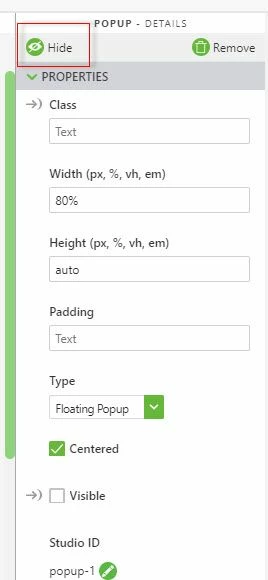
The 'hide' and 'show' actions are now located at the top of the properties panel for the widget. Once you select 'hide' the option will change to 'show'. 


hidePopup.jpg


Please share a screenshot if you are not able to see/access this property panel. 

1 reply

tmccombie21-Topaz IAnswer
21-Topaz I
March 13, 2019

The 'hide' and 'show' actions are now located at the top of the properties panel for the widget. Once you select 'hide' the option will change to 'show'. 


hidePopup.jpg


Please share a screenshot if you are not able to see/access this property panel. 

1-Visitor
March 13, 2019

@tmccombie wrote:

The 'hide' and 'show' actions are now located at the top of the properties panel for the widget. Once you select 'hide' the option will change to 'show'. 


hidePopup.jpg


Please share a screenshot if you are not able to see/access this property panel. 


Thank you very much !