10-Marble
March 29, 2019
Solved

Re: Playing multiple sequences with Hololens

  • March 29, 2019
  • 1 reply
  • 3590 views

Hi,


I am also having issue with playing multiple figures/sequences in Hololens. This would be reasonable for service procedures..

Is it still not possible? Any news or workarounds? 🙂 


Regards,

Bojan

    Best answer by ytella

    Hi Bojan,

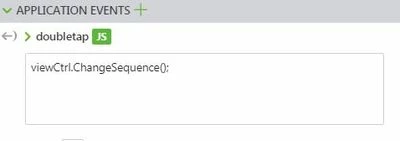
    Yes, it worked for me. I used the below JS function in Home.js and called it under an Application Event.

    $scope.ChangeSequence = function(seq_name)
    {
    $scope.view.wdg['model-1']['sequence'] = 'app/resources/Uploaded/l-Creo 3D - ElbowMotorReplacement.pvi';

    $timeout(function() {
    $scope.$broadcast('app.view["Home"].wdg["model-1"].svc.playAll');
    $scope.$applyAsync()
    }
    , 2000);
    };


    AppEvent1.JPG

    You would have to write separate functions for each sequence and link them in the Application Events as shown above.

    1 reply

    17-Peridot
    April 29, 2019

    Hi,

    A workaround to play multiple sequences is - extract the .pvi files and upload them separately on to the project. Once uploaded, use the resource path to activate the requested sequence:


    $scope.view.wdg['model-1']['sequence'] = 'app/resources/Uploaded/l-Creo 3D - ... .pvi';

    Hope this helps!

    bgračnar10-MarbleAuthor
    10-Marble
    April 30, 2019

    Hi ytella,

    I know for sure that this works for mobile experiences.

    I tried this also for hololens but I am not able to play sequence.. did it work for you?


    Under app events and JS for gestures I used: $scope.view.wdg['model-1']['sequence'] = 'app/resources/Uploaded/bobcatv43_Low.pvz/l-Creo 3D - Figure 1';

    I also bind this gesture to model with play all but no sucess.


    BR,

    Bojan

    ytella17-PeridotAnswer
    17-Peridot
    April 30, 2019

    Hi Bojan,

    Yes, it worked for me. I used the below JS function in Home.js and called it under an Application Event.

    $scope.ChangeSequence = function(seq_name)
    {
    $scope.view.wdg['model-1']['sequence'] = 'app/resources/Uploaded/l-Creo 3D - ElbowMotorReplacement.pvi';

    $timeout(function() {
    $scope.$broadcast('app.view["Home"].wdg["model-1"].svc.playAll');
    $scope.$applyAsync()
    }
    , 2000);
    };


    AppEvent1.JPG

    You would have to write separate functions for each sequence and link them in the Application Events as shown above.