15-Moonstone
November 10, 2017
Solved

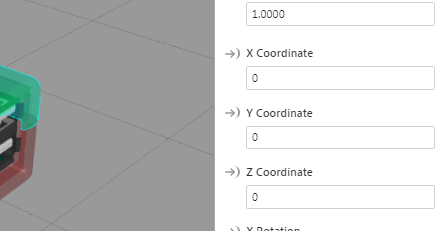
Read the coordinates of the model

  • November 10, 2017
  • 1 reply
  • 2032 views

Hi ,

It's possible to read the coordinates of a model or widget using javascript ?


Thanks in advance.

Giuseppe

Best answer by tmccombie

Hi Giuseppe. I was able to get the model coordinates to show on a label within the experience doing the following:

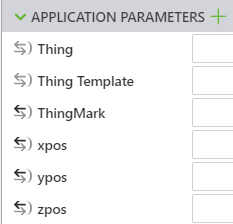
  1. Set up App parameters xpos, ypos, zpos
    2. Create 3 2D or 3D labels within your experience to display the coordinate values

    3. Create a button with title 'show coordinates'

    4. Bind xpos, ypos, & zpos to each corresponding label 'text' property.

    5. Add code to Home.js

      $scope.showCoords = function(){

                           var Xpos = document.querySelector('#model-1').getAttribute("x");

                           $scope.app.params.xpos = Xpos;

                           var Ypos = document.querySelector('#model-1').getAttribute("y");

                           $scope.app.params.ypos = Ypos;

                           var Zpos = document.querySelector('#model-1').getAttribute("z");

                           $scope.app.params.zpos = Zpos;

                         };

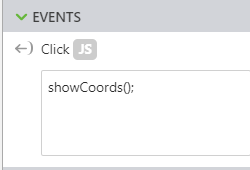
    6. Call showCoords(); on button click
    7. Save & publish.

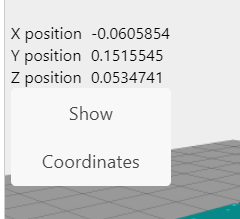
Here is what my preview looks like
1 reply

tmccombie21-Topaz IAnswer
21-Topaz I
November 15, 2017

Hi Giuseppe. I was able to get the model coordinates to show on a label within the experience doing the following:

  1. Set up App parameters xpos, ypos, zpos

    2. Create 3 2D or 3D labels within your experience to display the coordinate values

    3. Create a button with title 'show coordinates'

    4. Bind xpos, ypos, & zpos to each corresponding label 'text' property.

    5. Add code to Home.js

      $scope.showCoords = function(){

                           var Xpos = document.querySelector('#model-1').getAttribute("x");

                           $scope.app.params.xpos = Xpos;

                           var Ypos = document.querySelector('#model-1').getAttribute("y");

                           $scope.app.params.ypos = Ypos;

                           var Zpos = document.querySelector('#model-1').getAttribute("z");

                           $scope.app.params.zpos = Zpos;

                         };

    6. Call showCoords(); on button click

    7. Save & publish.

Here is what my preview looks like

15-Moonstone
November 16, 2017

Great Tara,

works perfectly, thank you for the precious help.