


Solved
Remove border on toggle button and 2D image
Hi,
I have a couple of items in the 2D border of my experience. An image and a toggle switch. The iamge background is transparent as set in the saved .png file and the toggle button has had it's background set to transparent in CSS as shown below.
//Button Class
.my-button {
font-family: Titillium Web;
color: red;
background-color: transparent;
}
However, I am still getting these grey lines appearing between elements in the experience. Does anyone have any idea what they are and more importantly how to turn them off!
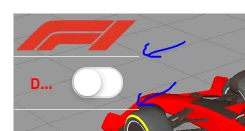
Thanks,
Sy