15-Moonstone
March 16, 2021
Solved

Repeater widget without ThingWorx connection.

  • March 16, 2021
  • 2 replies
  • 3793 views

Hi.


I am interested in populating a Repeater widget using an array of JSON elements defined within the .js file of the view. Given that the array has a uniform structure (each element has the same keys), how can I use this array to populate a Repeater widget?


Thank you!

Best answer by RolandRaytchev

thanks for the feedback.

The first point is to link/bind the app parameter to the repeater data 

and the second point is to bind the checkbox of the repeater to the item list. I did not find any other possibility, so Used a filter which is called for each item and will count . The count is on the windows here my_filter. I did not find other way to pass some static variable between the different filter calls


if(!window.my_filter) window.my_filter=1;
 else {
 if(window.my_filter>= value.length) window.my_filter=1;
 else {window.my_filter++;} }
 return(value[window.my_filter-1]['checked']);


This could is called for each item of the list. So the value is the passed list. And via my_filter which is the count for the called elements I will pass the correct checked property of the list.
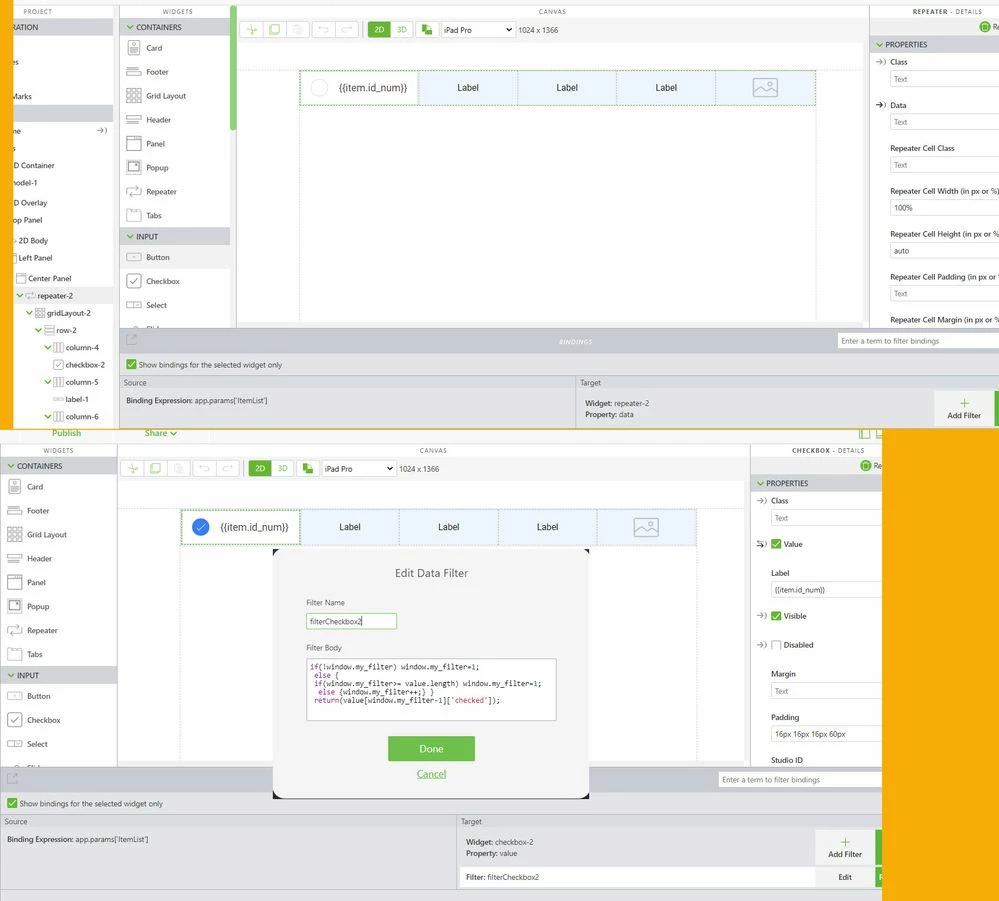

 

2021-03-24_13-57-06.jpg

2 replies

21-Topaz I
March 24, 2021

Hi @Radu ,

let say I have the following ItemList as json:


var ItemList = [
 {"display":"France","id_num":0,"checked":true,"value":"Paris" ,"src":"test.svg","someText":"some Text123"}, 
 {"display":"Italy","id_num":1,"checked":false,"value":"Rome" ,"src":"test1.svg","someText":""},
 {"display":"Spain","id_num":2,"checked":false,"value":"Madrid" ,"src":"test2.svg","someText":""},
 {"display":"UK","id_num":3,"checked":false,"value":"London" ,"src":"test3.svg","someText":""},
 {"display":"Germany","id_num":4,"checked":false,"value":"Berlin" ,"src":"test4.svg","someText":"-->"},
 {"display":"Norway","id_num":5,"checked":false,"value":"Oslo" ,"src":"test.svg","someText":""},
 {"display":"Switzerland","id_num":6,"checked":false,"value":"Bern" ,"src":"test1.svg","someText":""},
 {"display":"Greece","id_num":7,"checked":false,"value":"Athens" ,"src":"test2.svg","someText":""},
 {"display":"France","id_num":8,"checked":true,"value":"Paris" ,"src":"test3.svg","someText":"other Text"}
 ];//some list got from anywhere


>>> on Load of view I will set this list to a app param here e.g. "ItemList":


$scope.$on('$ionicView.afterEnter', function() {
 //set the parameter ItemList to the value of ItemList
 $scope.app.params["ItemList"] = ItemList;
 
})


And  I will create a  dependencies from app param to the repeater data property

2021-03-24_11-48-38.jpg

Later testing in preview this will have the following display:

2021-03-24_11-51-14.jpg


>>>In the repater I want also to handle the click selection on the checkbox and to display some svg files from the upload folder. To handle the click I used some code like (not the best example but it works) :


//==================================================================
twx.app.fn.clickItemInRepeater = function(item,list,isMultiSelect)
{
console.warn("called clickItemInRepeater()");
 console.warn(isMultiSelect);
 
 $scope.changeValueInJson(list,item.id_num,'checked', item.checked?false:true)
 console.log("clickItemInRepeater::ROW Selected:: "+JSON.stringify(item))
 $scope.setWidgetProp('textArea-2','text',JSON.stringify(item))
 $scope.$applyAsync(); 
}; 

//==================================================================
//==================================================================
$scope.changeValueInJson= function (obj,id_num,field2change, new_value)
{
 console.warn("$scope.changeValueInJson(obj, id_num="+id_num+",field2change="+field2change+", new_value="+new_value+")")
if(new_value==undefined) return;
try{if( obj[0][field2change]==undefined) return;}catch(wrong){console.error("error::"+wrong);return;}

for (var i = 0; i < obj.length; i++){ 
 if (obj[i]['id_num'] == id_num){
 obj[i][field2change]= new_value;}} 
 // console.log("new OBJ:");console.warn(obj)
 $scope.app.params["ItemList"] = "";
 $scope.app.params["ItemList"] = JSON.parse(JSON.stringify(obj));//check value
 $scope.$applyAsync(); 
}
//==================================================================

$scope.findValueInJson= function (obj,val,nameIn,nameOut )
{
//obj is the list as input where we will search for val
// val is the value which is used to compare
// nameIn is the key in JSON which value should be compared to val
//display is the value which is returned 

for (var i = 0; i < obj.length; i++){
 // look for the entry with a matching `code` value
 if (obj[i][nameIn] == val){
 // we found it
 // obj[i].name is the matched result
 
 return obj[i][nameOut];
 }
}
}


>>> so display the results in text widgets:


2021-03-24_11-59-36.jpg

I attached the demo project to this post. I hope it could be helpful.


Radu15-MoonstoneAuthor
15-Moonstone
March 24, 2021

Hi, Roland.


Thank you for your help. I did what you said about connecting the array to an Application Parameter before, but I had the issue that the elements within the repeater would not update.


I see that you put some filters on each element within a row of the repeater widget. Could you please go into further detail how data from the Application Parameter is passed to each component of the repeater widget? This is the main point of the solution you provided that I don't understand.


Thank you!

21-Topaz I
March 24, 2021

thanks for the feedback.

The first point is to link/bind the app parameter to the repeater data 

and the second point is to bind the checkbox of the repeater to the item list. I did not find any other possibility, so Used a filter which is called for each item and will count . The count is on the windows here my_filter. I did not find other way to pass some static variable between the different filter calls


if(!window.my_filter) window.my_filter=1;
 else {
 if(window.my_filter>= value.length) window.my_filter=1;
 else {window.my_filter++;} }
 return(value[window.my_filter-1]['checked']);


This could is called for each item of the list. So the value is the passed list. And via my_filter which is the count for the called elements I will pass the correct checked property of the list.

 

2021-03-24_13-57-06.jpg

16-Pearl
July 12, 2021

Hi all,


just dived into this function and noticed a view things:

1. When writing Obj to application parameter you have to use $scope.app.params["ItemList"] = JSON.parse(JSON.stringify(obj)); otherwise, the object will be written in the app-parameter, but it will not refresh the widgets!

2. The filters will always be called two times. this is, why we have to make it so complicated. Otherwise it will only display every second entry!

3. value is the content of the application parameter, which will be filtered.

window is all content, that is displayed in your browser window, just below this level, your filter is located. The filter just contains a number that describes, which line of the object we want to read. so if it is the first entry, then my_filter is 1 and it returns the value assigned to app-parameter[0]['checked']

return(value[window.my_filter-1]['checked']);

 whity_0-1626088449875.png

You can have a look at "window" by clicking here: whity_1-1626089904055.png , then open console and type window. You can now find the filters in this list:

whity_2-1626090007126.png


4. The name of the filter is assigned with: window.filter_amount=1;

You can use any name you want, for example window.filterCheckbox. This makes it easier to keep them apart.


5. The filter for the pictures uses my_filter3, which is already in use for the row of the 1st text label. This is why the wrong images are displayed.


Finally I want to add, that this functionality can be very usefull! You can create groups of parts and from this proceed further. The list can be edited dynamicly eg. with ItemList .push({"display":"Japan","id_num":i++,"checked":false,"value":$scope.view.wdg['country'].text),"src":"test6.svg","someText":""});

Thanks again Roland for your contributions, this makes Vuforia much more advantageous. 


Regards

Whity