12-Amethyst
May 28, 2019
Solved

Select Widget default value

  • May 28, 2019
  • 1 reply
  • 3681 views

I am using the select widget to select the sequence to play.  I would like to have this list default to a specific sequence.  Is this possible?

Best answer by ytella

Hi @Wayne_Beck ,


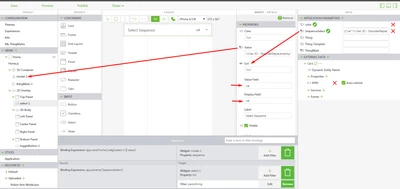
One of the ways to set a default selection for select input widget is as shown below:

  • Create an Application Parameter by clicking + next to Application Parameters. The app param value is a JSON formatted array. For example.
    • [{"val":" l-Creo 3D - Figure 1.pvi"},{"val":" l-Creo 3D – Figure 2.pvi"}] Screenshot_13.png


  • The object attribute name val must be specified in the Value Field and Display Field properties of the Select widget.
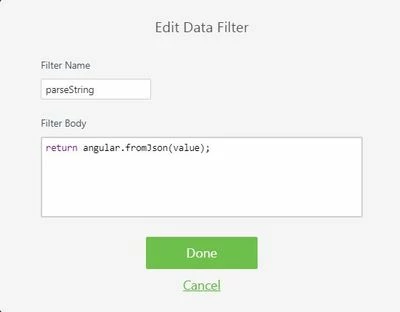
  • The app param is then bound to the List property of the Select widget. This binding has a filter on it with the following expression:
    • return angular.fromJson(value);Capture.JPG


  • Bind the Value property of the Select widget to the Sequence property of the Model widget
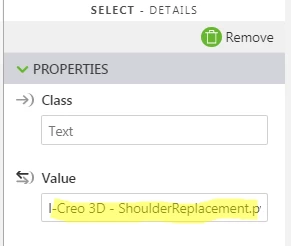
  • Now, put the PVI file name in as the default ‘value’ for the select widget as shown below:Screenshot_12.png


Hope this helps!

1 reply

ytella17-PeridotAnswer
17-Peridot
May 28, 2019

Hi @Wayne_Beck ,


One of the ways to set a default selection for select input widget is as shown below:

  • Create an Application Parameter by clicking + next to Application Parameters. The app param value is a JSON formatted array. For example.
    • [{"val":" l-Creo 3D - Figure 1.pvi"},{"val":" l-Creo 3D – Figure 2.pvi"}] Screenshot_13.png


  • The object attribute name val must be specified in the Value Field and Display Field properties of the Select widget.
  • The app param is then bound to the List property of the Select widget. This binding has a filter on it with the following expression:
    • return angular.fromJson(value);Capture.JPG


  • Bind the Value property of the Select widget to the Sequence property of the Model widget
  • Now, put the PVI file name in as the default ‘value’ for the select widget as shown below:Screenshot_12.png


Hope this helps!

12-Amethyst
May 29, 2019

This helped but now I face a few issues.  I would prefer my list not have "l-Creo 3D - Installation Orientation.pvi" in the drop down and just be "Installation Orientation".  Second my play button no longer works to start the sequence.  Any help on this would be great.

17-Peridot
May 29, 2019

Hi @Wayne_Beck,


  • To change the display name in the list, update the array in the Application Parameter as follows:
    • [{"val":"l-Creo 3D - ShoulderReplacement.pvi", "name":"ShoulderReplacement"},{"val":"l-Creo 3D - ElbowMotorReplacement.pvi", "name":"ElbowReplacement"}]
    • Now, update the Display filed property of Select widget to name as shown below:Screenshot_14.png


  • Drag and Drop a button widget on to the 2D canvas and bind the click event to the PlayAll property of the model widgetScreenshot_15.png