

November 9, 2017
Solved

sequences from Cre illustrate

  • November 9, 2017
  • 2 replies
  • 3889 views

Hi

i have created some sequences creo illustrate and i would like to play these in Thingworx studio.
In illustrate i have pressed publish and get i  pvz. file, which i uploaded to studio .
But after i published i could not see the ​sequences ( i also made a play button ).

So i hope somebody can help me.

Thanks.


Alperen
This topic has been closed for replies.
Best answer by mschuetz

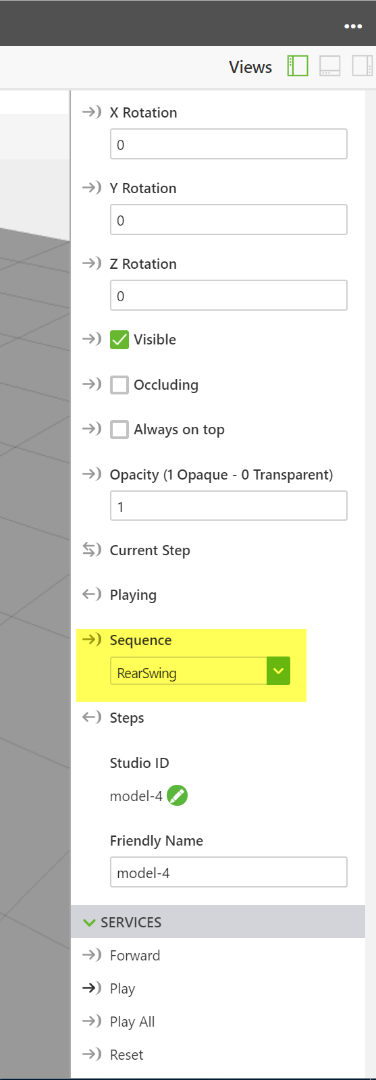
on the model widget is a drop down for sequences. you can simply choose your sequence from here. No need for renaming, unzipping or manually adding of pvi files.

2 replies

17-Peridot
November 9, 2017

Hi Alperen,

Please follow the below steps to add a sequence to the 3D model:

  • Extract PVI file from the resulting PVZ file.
  • The PVI file must be added as a separate resource into the project.
  • Once that PVI file is added as resource, we can select that PVI file from the dropdown list of Sequence property as shown below:

  • Now bind the click action of a button or toggle button to the 3D model components play service. If we toggle or press this play button it will then invoke the playback of that sequence service.
17-Peridot
November 9, 2017

Please follow the below steps to extract the PVI file from the resulting pvz file:

  • Change the pvz file extension from .pvz to .zip
  • Open that zip file and then drag the pvi file out from that folder.
  • Now change the extension from .zip to .pvz
mschuetz5-Regular MemberAnswer
5-Regular Member
November 10, 2017

on the model widget is a drop down for sequences. you can simply choose your sequence from here. No need for renaming, unzipping or manually adding of pvi files.

1-Visitor
September 11, 2018

I have published a file from Creo Illustrate as a .pvz but have no luck getting ThingWorx to play the sequences after choosing the Sequence in Studio.

I am working with and learning Creo Illustrate 5.0 with the task of making sequences to be viewed in ThingWorx.

I have made a simple file for testing purposes and when the file is opened in ThingWorx Studio (8.2.2.3099) the Model shows up but it will not play the sequences.

Is there a setting or something special that needs to be done?


16-Pearl
September 11, 2018

Hi Susan,


have you assigned a klick event, to start the animation? You can find a guide here:

http://support.ptc.com/help/vuforia/studio/en/#page/Studio_Help_Center%2FIntermediateHandsfreeAnimation.html%23

If this doesn't work, I would try to load an example applikation like the helicopter. Now klick on preview and test if you can see the animations there. If it still won't play, then something must be wrong with your browser.