Hi @fbdsilva
we do not have extra chalk widget but calling of chalk in 2d widget but it should work also from Hyperlink widget and also via JavaScript code
So to work this is required:
- chalk is installed on the mobile platform
- I think the first time when you start chalk from Vuforia View it will request permissions for starting chalk
- this will not work in Preview mode - only on mobile device
Here in the picture below - there are shown 2 ways - 1.) hyperlink widget via URL (url=https://admin.vuforiachalk.com/call)
or 2.) form button calling js code (it could be any widget supporting UI JS box on click or other actions)
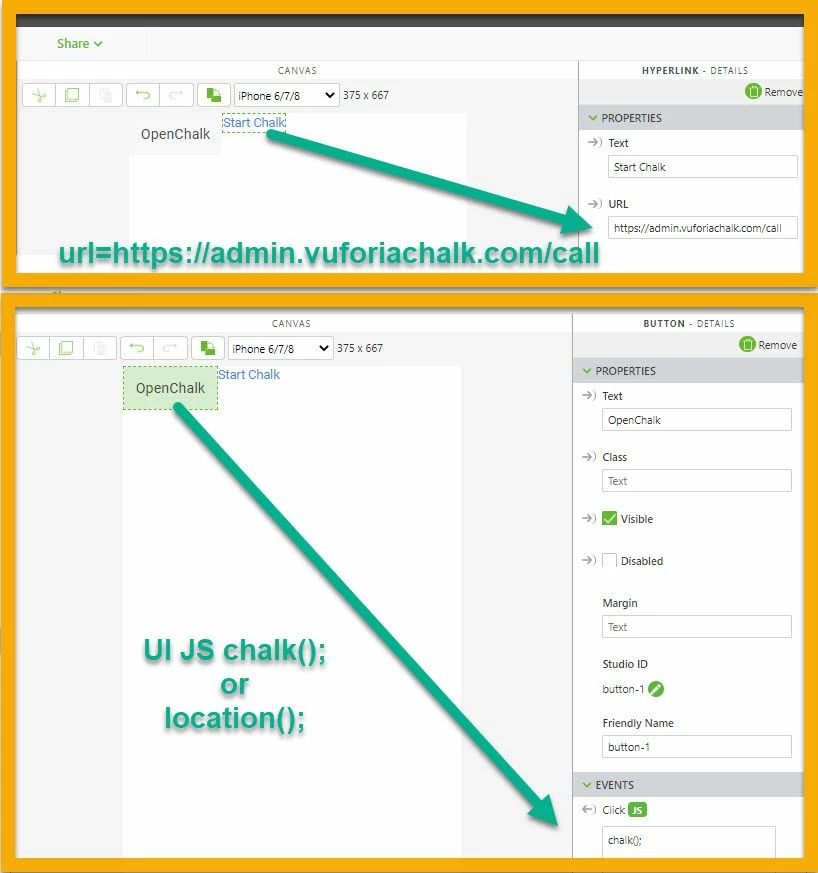
where in US UI you can use e.g. one of the following js code chalk() or location() - I tested both on IOS device Ipad and they are working fine.
/////////////////////////////////////////////////// this will not has effect on IOS
$scope.chalk = function ( ) {
 console.log('call https://admin.vuforiachalk.com/call' );
 try{

 	window.location.href='https://admin.vuforiachalk.com/call';
 twx.app.fn.addSnackbarMessage("window.location.href="+window.location.href,"twLogo");
 }
 catch(e)
 {
 alert('call failed ' + e);
 }
}
///////////////////////////////////////////////////
//or
///////////////////////////////////////////////////
$scope.location = function () {

 try{
 $timeout( () => {var ref = window.location='https://admin.vuforiachalk.com/call' ;

 twx.app.fn.addSnackbarMessage("window.location="+ref,"twLogo");},500)
 }
 catch(e)
 {
 alert('chalk location failed ' + e);
 }
}

