15-Moonstone
February 28, 2019
Solved

Step Description in Studio

  • February 28, 2019
  • 2 replies
  • 1742 views

I created sequence in Creo Illustrate with some notes & I want to show that description at every step. 

I bind model property (steps) to Lable but it's showing no. of steps. How can I show that notes in studio.

Best answer by RolandRaytchev

Hi @Swapnil_More , 

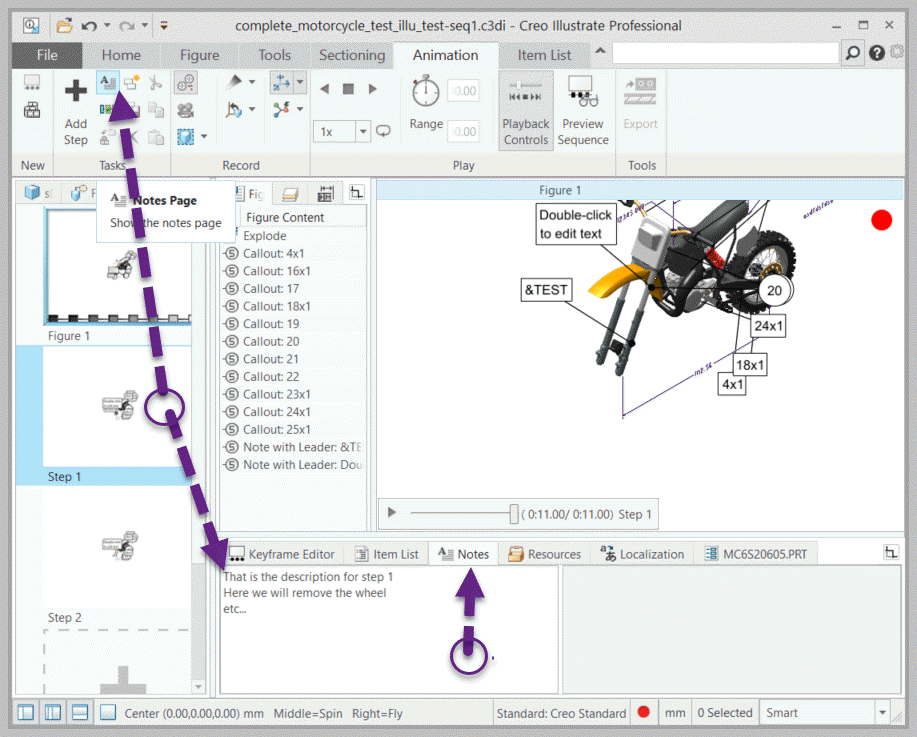
I think you mention the description info and you meant the note page as shown on the picutre above - here I want to make it clear:


2019-02-28_15-41-31.gif

In the current functionality the info of this  note will be not passed to  Studio and we can not used it directly in Studio widget  yet. So far I know there are an enhancement requested  but it is not implmented yet or I do not have info about such implementation

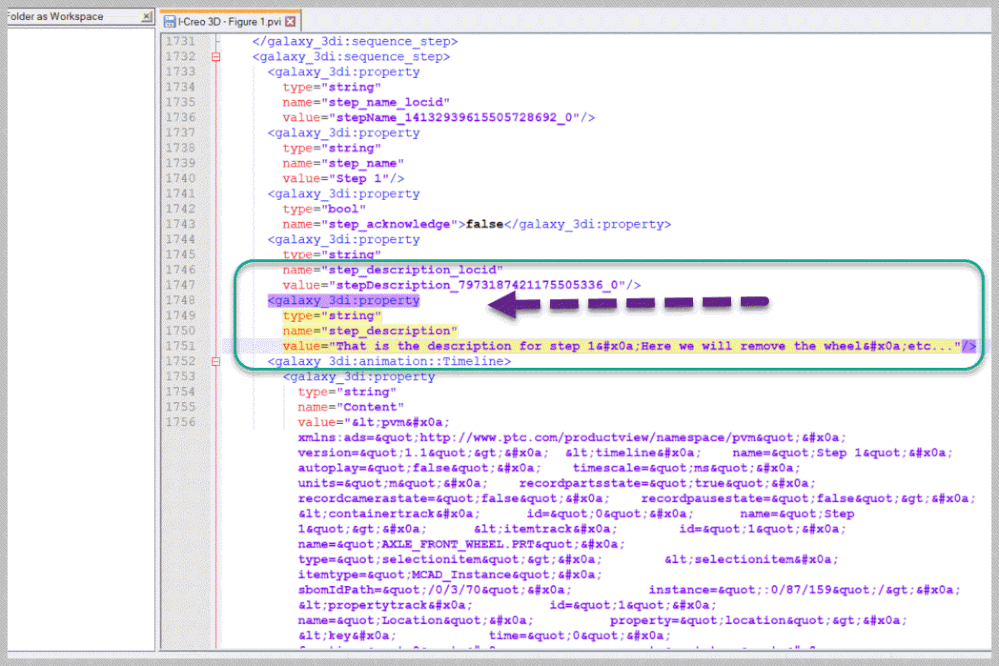
When we check the pvz file -> rename it as zip file and then extract - then we can find in the sequence file *.pvi - the desired informaiton - as shown here in example:

2019-02-28_16-01-19.gif

So the *.pvi file has an xml style so you can easy extact this info using some script. So you can define  form there an jason or other array which contains the information and later could be pasted in studio project  and used for setting some widget properies  when a step is played. Such techniques was  already described in the post "Display sequence step names from Creo Illustrate"


"

2 replies

17-Peridot
February 28, 2019

Hello Swapnil,


Did you look to this thread ?

Do you a similar javascript function?


Best regards,

Samuel

21-Topaz I
February 28, 2019

Hi @Swapnil_More , 

I think you mention the description info and you meant the note page as shown on the picutre above - here I want to make it clear:


2019-02-28_15-41-31.gif

In the current functionality the info of this  note will be not passed to  Studio and we can not used it directly in Studio widget  yet. So far I know there are an enhancement requested  but it is not implmented yet or I do not have info about such implementation

When we check the pvz file -> rename it as zip file and then extract - then we can find in the sequence file *.pvi - the desired informaiton - as shown here in example:

2019-02-28_16-01-19.gif

So the *.pvi file has an xml style so you can easy extact this info using some script. So you can define  form there an jason or other array which contains the information and later could be pasted in studio project  and used for setting some widget properies  when a step is played. Such techniques was  already described in the post "Display sequence step names from Creo Illustrate"


"