1-Visitor
February 18, 2020
Solved

Submenu in header

  • February 18, 2020
  • 1 reply
  • 1000 views

Hello there,


is it possible to create an submenu in the header button?

Any response is welcomed.

Thanks in advance.

Best answer by RolandRaytchev

Hi @DenGrz ,


so far I know there is no specific option to do this but we can place in the primary, secondary buttons and in the header section any widget with proper css style to achieve the desired look it requires some tests:

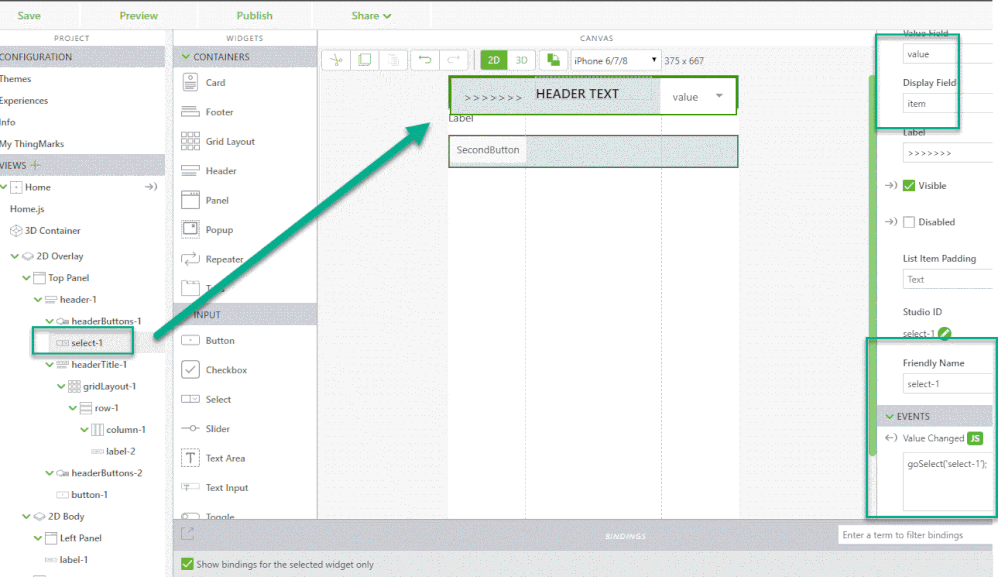
Here one possible  example where I used for a test  a select widget added to the primary button:
 

2020-02-18_12-39-53.gif


And the code to fill the select widget and to handle the click event was something like this:


$scope.populateModelList = function() {

var my_json=[
 //
{"item":"COMMAND1","value":"value1"},
{"item":"COMMAND2","value":"value2"},
{"item":"COMMAND3","value":"value3"},
{"item":"COMMAND4","value":"value4"}
 ]; 
 console.warn(my_json); 
};
/////////////////////////////////
$scope.$on('$ionicView.afterEnter', function() {$scope.populateModelList();});
//this is used for the select widget event
$scope.goSelect = function(selectName) { 
 
var selectedValue= $scope.getWidgetProp(selectName, 'value')
let myCmd_msg="Selected Value was = " + selectedValue;
console.warn(myCmd_msg)
twx.app.fn.addSnackbarMessage(myCmd_msg ,"twLogo");
$scope.setWidgetProp(selectName, 'value','') // will make empty the menu field again 
 
 switch(selectedValue) {
 
 case "value1": $timeout(twx.app.fn.addSnackbarMessage("COMMAND1 Action!" ,"twLogo"),1000);break;
 case "value2": $timeout(twx.app.fn.addSnackbarMessage("COMMAND2 Action!" ,"twLogo"),1000);break;
 case "value3": $timeout(twx.app.fn.addSnackbarMessage("COMMAND3 Action!" ,"twLogo"),1000);break;
 case "value4": $timeout(twx.app.fn.addSnackbarMessage("COMMAND4 Action!" ,"twLogo"),1000);break;

 }
}; 

 

1 reply

21-Topaz I
February 18, 2020

Hi @DenGrz ,


so far I know there is no specific option to do this but we can place in the primary, secondary buttons and in the header section any widget with proper css style to achieve the desired look it requires some tests:

Here one possible  example where I used for a test  a select widget added to the primary button:


2020-02-18_12-39-53.gif


And the code to fill the select widget and to handle the click event was something like this:


$scope.populateModelList = function() {

var my_json=[
 //
{"item":"COMMAND1","value":"value1"},
{"item":"COMMAND2","value":"value2"},
{"item":"COMMAND3","value":"value3"},
{"item":"COMMAND4","value":"value4"}
 ]; 
 console.warn(my_json); 
};
/////////////////////////////////
$scope.$on('$ionicView.afterEnter', function() {$scope.populateModelList();});
//this is used for the select widget event
$scope.goSelect = function(selectName) { 
 
var selectedValue= $scope.getWidgetProp(selectName, 'value')
let myCmd_msg="Selected Value was = " + selectedValue;
console.warn(myCmd_msg)
twx.app.fn.addSnackbarMessage(myCmd_msg ,"twLogo");
$scope.setWidgetProp(selectName, 'value','') // will make empty the menu field again 
 
 switch(selectedValue) {
 
 case "value1": $timeout(twx.app.fn.addSnackbarMessage("COMMAND1 Action!" ,"twLogo"),1000);break;
 case "value2": $timeout(twx.app.fn.addSnackbarMessage("COMMAND2 Action!" ,"twLogo"),1000);break;
 case "value3": $timeout(twx.app.fn.addSnackbarMessage("COMMAND3 Action!" ,"twLogo"),1000);break;
 case "value4": $timeout(twx.app.fn.addSnackbarMessage("COMMAND4 Action!" ,"twLogo"),1000);break;

 }
};
