
1-Visitor
January 23, 2017
Question

ThingWorx Studio project can not publish successfully. Please direct the solution

  • January 23, 2017
  • 2 replies
  • 6801 views

To register following information in Settings
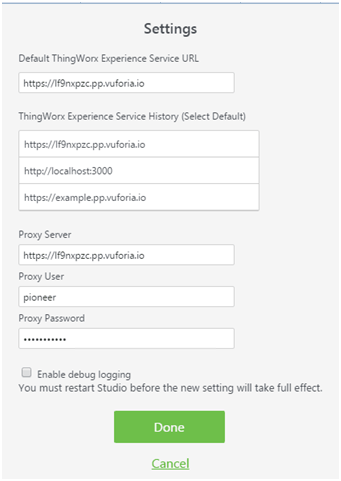


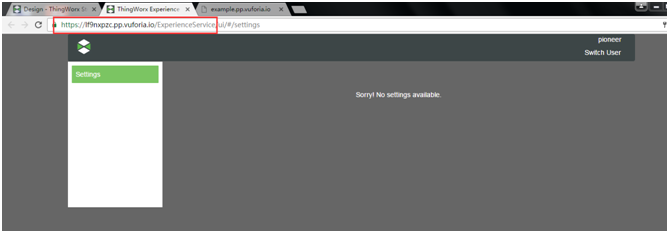
It is accessible via browser with same account and password.

URL: https://lf9nxpzc.pp.vuforia.io/VuforiaExperienceService

Username: pioneer

Password: xxxxxxx
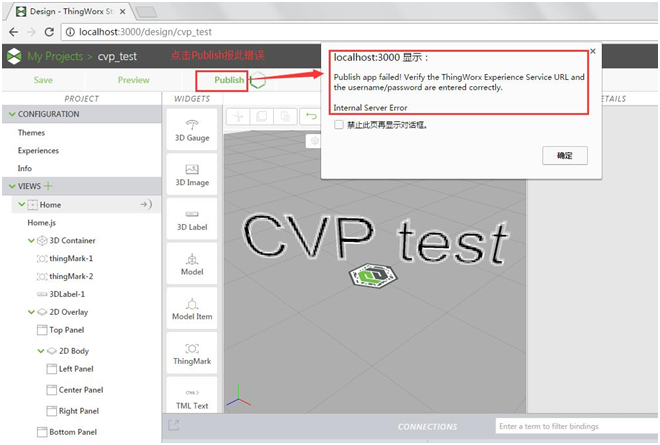
However, it reports following error when clicking Publish in Project.( the account and password is confirmed many times, so mannual input mistake can be ruled out.)
2 replies

12-Amethyst
January 25, 2017

Hi Jiali,

most likely your problem is related to your proxy settings. The URL that you entered for the proxy server is the same as the Thingworx Experience service URL. Instead you'll have to enter the URL of the proxy server that your company configured, most likely an in-house server.

There are multiple ways to figure out what this server is:

  • It can be part of your browser's configuration. You can get there from Chrome's settings dialog:
    ProxySettings.png
  • If a config script is used, follow this document to get the resolved URL of your proxy server.

I hope this helps, moritz

5-Regular Member
January 25, 2017

Jiali Guo​ Most probably your network has restricted access, that might be the reason why the ProxyTester tool didn't work. Can you try publishing the experience from a NON-Corporate network or a Public Network?

-Giri

jguo-211-VisitorAuthor
1-Visitor
January 26, 2017

Hi Giri:

     I have tried to publish from a non-corporate network or public network, the same problem occurs, the above release error is released through the public network.

1-Visitor
January 26, 2017

Hi,

I was having an similar issue, although not through a proxy server, however despite having that "Local Host" warning dialog box appearing stating that the Publishing was unsuccessful, I went ahead regardless and viewed the ThingMark I had assigned for the various projects I had tried to publish and I found that, despite the warning messages, the projects did actually publish perfectly well!

I am still getting that warning dialog box with every project I publish, but I simply ignore it! My projects still publish OK! Have you gone ahead and just try to see if you can scan in the associated ThingMark to see if your project has published? Perhaps you will find it has Jiali Guo?

Regards,

Brian

5-Regular Member
January 26, 2017

In the Studio Project panel, when you navigate to Configuration section's Info tab and execute the 'Validate' button (next to ThingWorx Experience Service field) does it prompt error? I mean after providing your credentials.

jguo-211-VisitorAuthor
1-Visitor
February 8, 2017

Hi,Giri:


     If Settings Proxy Server is empty, click "Valid" button in Info Editor, prompting Validate

1.png

     If Settings Proxy Server is not empty, click "Valid" button in Info Editor, prompting: Invalid Server: Could not contact the ThingWorx Experience Service, verify the server is running. Error: tunneling socket could not be established, cause=socket hang up

2.png


     settings Proxy Server is empty, click the Publish button to wait for about 3 minutes prompted the following chart error

3.png

5-Regular Member
February 8, 2017

Yes, technically the proxy server shouldn't be the URL of the Experience Service, for the correct proxy I would strongly recommend either contact your IT team or follow the procedure laid out by Moritz.

Now that without proxy, the validation is successful. From here on you can skip the proxy part. Coming to pop-up error, please verify your username and password, make sure you are using the credentials provided in the "welcome email" (not the ones you've created). Also try clearing browsing cache and give it a try.

jguo-211-VisitorAuthor
1-Visitor
February 8, 2017

Hi,Giri:

   Will this issue with the account permissions is related? Can I provide you with a password,Do you help verify it?

   The browser cache has tried to clean up many times, and the problem still occurs.

   The user is using the credentials provided in the "welcome email".

1486567813(1).png

5-Regular Member
February 8, 2017

Sure, feel free to send a direct personal message, if you would like to share the account details.

1-Visitor
February 13, 2017

Hi,Giri:

   This account you can publish the local success?