Hi @Naveen_K,
you can also use the Studio UI and unpublish the proejct.
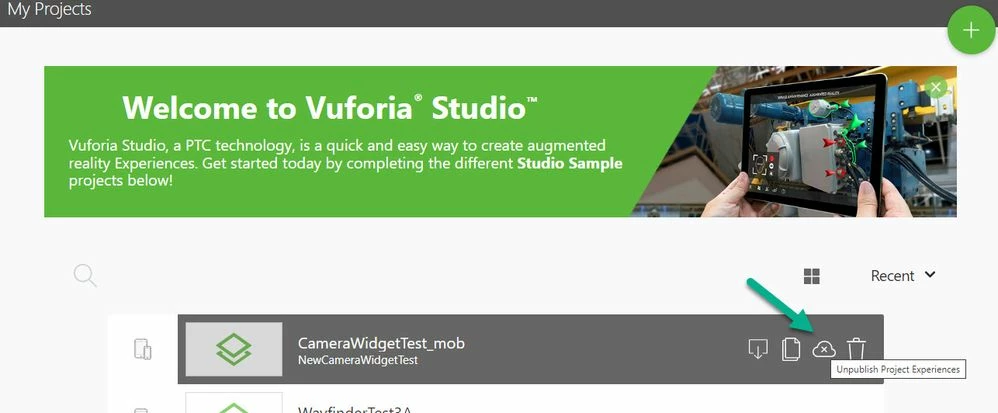
Later you can publish the proejct. What is the effect then?
In generally regarding to this issue - there could be found related informaiton in some PTC TechSupport articles -> example: https://www.ptc.com/en/support/article/CS284529
saying in resoltuion something like this:
//================
Workaround:
- an Experience Service could be called in a preview mode through URL e.g. :
- workaround works for Vuforia Studio Version 8.1.x with the default program setting
- with version 8.2.xx and newer the workaround requires addtional settings in the configuration file : <Windows OS User>\Documents\VuforiaStudio\builder-settings.json
- the following options could be set in the builder-setting.json file:
"publishPreview": true - allow to publish the preview to a browser outside the Studio environment
or
"enableDebugLogging": true - the option enables the Debug logging in the Studio settings
- user could set the option "enableDebugLogging" also via Vuforia Studio UI ->Settings -> checkbox Enable Debug Logging
Also possibly the following configuration.json option could be tested if they have effect on this behavior:
{
…..
"nossl":true,
"nohttp2":true
}
//================
- alternatively you can check the call :
curl -u <userId>:<password> -H "Accept:application/json" http://xxxxx/ExperienceService/ExperienceService/content/projects/project_name/access
which should return the value example :
{"ispublic":false}
here the output is for project which is reported by ES as not public
- in case of that call you need always for this request /Rest API call on server user/password. So Rest API call without credentials should not work so far I know.
- you can also check if you project is correctly reported from the ES in the metadata is ok so you can try:
curl -u <userId>:<password> -H "Accept:application/json" http://xxxxx/ExperienceService/ExperienceService/content/projects/ >>output_data.txt
and check then in the output the data what is returned - so possibly you can find some setting
curl -X PUT -u user:password -H "X-Requested-With: XMLHttpRequest" -F "File=@MyProject.zip" https://localhost:2019/ExperienceService/content/projects/myproject
curl -u user:password -H "X-Requested-With: XMLHttpRequest" -F "File=@MyProject.zip" https://localhost:2019/ExperienceService/content/projects?replace=true
I did use such calls in the past but could not remember to have some issue as described in your topic so possibly you can check if this info is helpful in your case. Thanks

