1-Visitor
November 14, 2019
Solved

Translating a model when clicked on it.

  • November 14, 2019
  • 2 replies
  • 4604 views

I want to translate a model in Y direction using javascript but is not able to do so. I tried a method given by Roland Raytchev in this link https://community.ptc.com/t5/Vuforia-Studio/3D-object-movements-using-JavaScript/m-p/592546#M5001

but was not able to do so. I also tried quadcopter example but due to lack of coding experience was again unable to do so. 


Any help would be appreciated.

Best answer by RolandRaytchev

Hi @vivekse 


I think JavaScript  expression in your project is not quite correct !


$scope.moveOnYAxis = function() {
$scope.setWidgetProp( "model-1", "ty", $scope.getWidgetProp( "model-test", "ty") + 1.0);}


>> the following problems:

1.) translation axis coud be "x", "y" and "z" and rotations respectively "rx", "ry" and "rz" -> property “tx" does not exist

2.) so far I know we have setWidgetProp  but we do not have getWidgetProp !

You need to use the syntax $scope.view.wdg[WidgetName][propertyName] instead

Another problem is that this code will have as result a jump. But so far, I understand you need continuous movement. Right?


A correct approach could be this one (add this code 1:1 in your project Home.js) :


/////////////////// function translateOnAxis definition with arguments
//function Arguments:
// WidgetName --> e.g. "model-1"
//Axis --> could 2x", "y" or "z"
//distance --> in meter m=1 is 1meter
//speed --> in meter per second
///////////////// translateOnAxis function body
$scope.translateOnAxis = function(WidgetName,Axis,distance,speed) {

var debug=false; // when true prints in the console but make slow! 
var interval = 0.05*speed // distance for 0.05 sec
var count=0;
var ready = false;
//=== loop for the movement
for(v=0;v< distance;v+=interval)
 {count++ // this counts the step
 let movedDistance=($scope.view.wdg[WidgetName][Axis]+ interval*count)
 //check if we arrieved on the final destination
 if (movedDistance > distance) {moved_distance=distance; ready = true;}
 //print this to console if we want to debug
 if(debug)console.log("v="+v+" interval="+interval+ " call delay = "+count*30 +" moved distance ="+movedDistance)
 
 $timeout( ()=>{
 $scope.$apply(()=> {$scope.setWidgetProp( WidgetName, Axis, movedDistance)})
 },count*50);
if(ready) break; }
}
//============ end of $scope.translateOnAxis
//definition of the click function 
$scope.testModel1Click= function(){
//translate model "model-1"
// 1 meter about along the "y" axis
// speed is 0.1 m/sec - not exact
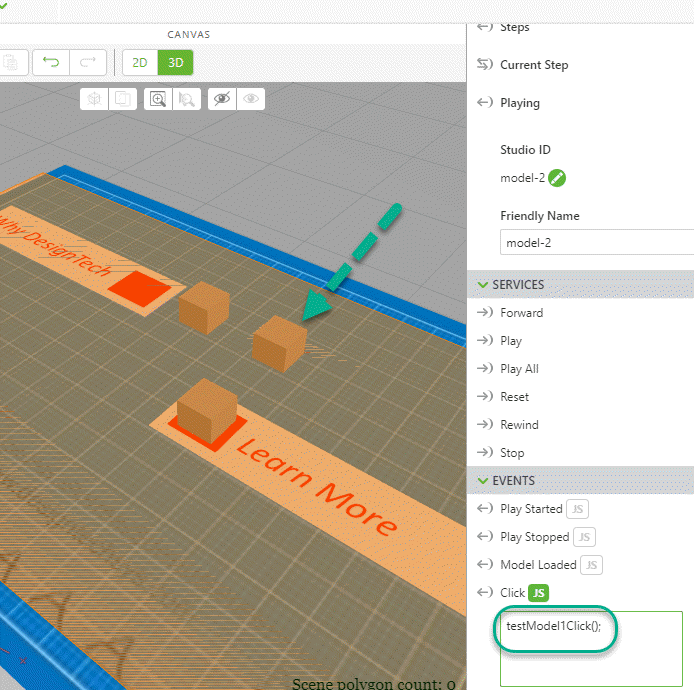
$scope.translateOnAxis("model-1","y",1,0.1) 
}


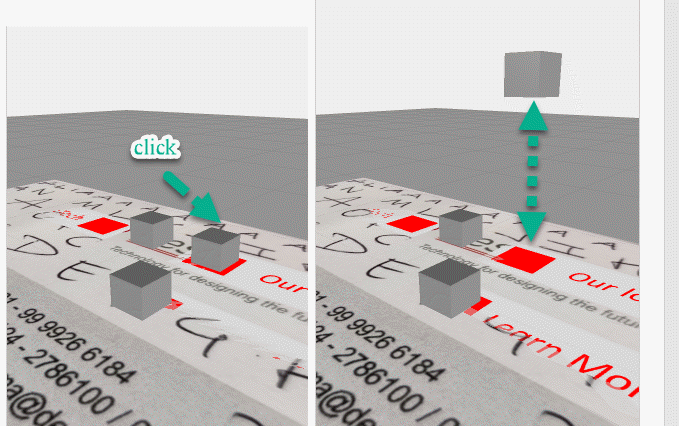
The function testModel1Click we can use then for model-1 - click event
 

2019-11-14_19-00-23.gif

And then when testing it :


2019-11-14_19-02-24.gif


Analogous you can define testModel2Click() for the translation of  model-2 and testModel3Click() for the translation of  model-3


At the end I want to mention that my opinion,  moving modelItem widget is better as movement of model widget but it is up to you how to design it.


 

2 replies

17-Peridot
November 14, 2019

Hello Vivekse,


So, I suppose that's you have followed these steps :

  1. In 3D View, add a Model named model-test
  2. In 2D View, add a Button
  3. This button should a Javascript function (For example the Javascript function is named moveOnYAxis() )
  4. In the BUTTON - DETAILS panel, in EVENTS section, in Click event, click on the button named JS
  5. In Expression text editor, enter moveOnYAxis()
  6. This Javascript function is defined in Home.js file (if the View is named Home as the default one), enter this code :
$scope.moveOnYAxis = function() {
 $scope.setWidgetProp( "model-test", "ty", $scope.getWidgetProp( "model-test", "ty") + 1.0);
}

.

What this function is doing ?

   $scope.getWidgetProp( "model-test", "ty") is looking the current position on the Y axis (ty) of the 3D model named model-test

   $scope.setWidgetProp( "model-test", "ty", is to modify the position on the Y axis of of the 3D model named model-test

   We apply + 1.0 on the current location.

  So, 3D Model will move up!


  • Is it helping you?


 Best regards,

Samuel

vivekse1-VisitorAuthor
1-Visitor
November 14, 2019

Thank you for the reply but it's still not working.

21-Topaz I
November 14, 2019

Hi @vivekse 


I think JavaScript  expression in your project is not quite correct !


$scope.moveOnYAxis = function() {
$scope.setWidgetProp( "model-1", "ty", $scope.getWidgetProp( "model-test", "ty") + 1.0);}


>> the following problems:

1.) translation axis coud be "x", "y" and "z" and rotations respectively "rx", "ry" and "rz" -> property “tx" does not exist

2.) so far I know we have setWidgetProp  but we do not have getWidgetProp !

You need to use the syntax $scope.view.wdg[WidgetName][propertyName] instead

Another problem is that this code will have as result a jump. But so far, I understand you need continuous movement. Right?


A correct approach could be this one (add this code 1:1 in your project Home.js) :


/////////////////// function translateOnAxis definition with arguments
//function Arguments:
// WidgetName --> e.g. "model-1"
//Axis --> could 2x", "y" or "z"
//distance --> in meter m=1 is 1meter
//speed --> in meter per second
///////////////// translateOnAxis function body
$scope.translateOnAxis = function(WidgetName,Axis,distance,speed) {

var debug=false; // when true prints in the console but make slow! 
var interval = 0.05*speed // distance for 0.05 sec
var count=0;
var ready = false;
//=== loop for the movement
for(v=0;v< distance;v+=interval)
 {count++ // this counts the step
 let movedDistance=($scope.view.wdg[WidgetName][Axis]+ interval*count)
 //check if we arrieved on the final destination
 if (movedDistance > distance) {moved_distance=distance; ready = true;}
 //print this to console if we want to debug
 if(debug)console.log("v="+v+" interval="+interval+ " call delay = "+count*30 +" moved distance ="+movedDistance)
 
 $timeout( ()=>{
 $scope.$apply(()=> {$scope.setWidgetProp( WidgetName, Axis, movedDistance)})
 },count*50);
if(ready) break; }
}
//============ end of $scope.translateOnAxis
//definition of the click function 
$scope.testModel1Click= function(){
//translate model "model-1"
// 1 meter about along the "y" axis
// speed is 0.1 m/sec - not exact
$scope.translateOnAxis("model-1","y",1,0.1) 
}


The function testModel1Click we can use then for model-1 - click event


2019-11-14_19-00-23.gif

And then when testing it :


2019-11-14_19-02-24.gif


Analogous you can define testModel2Click() for the translation of  model-2 and testModel3Click() for the translation of  model-3


At the end I want to mention that my opinion,  moving modelItem widget is better as movement of model widget but it is up to you how to design it.


21-Topaz I
November 14, 2019

Hi @vivekse ,


could you provide an example project (possibly small one without sensitve data) where I could see what you did  try and where I could check what is going wrong and try to fix it. Thanks!


Acutely to move an object you do not need to use javaScript coding. You can move it via binding to a parameter /indirect/ or to binding to a 2d widget e.g. slider /direct/

Here I attached a small project displaying this concept.  /there is a second view concept2 is more relevant/

vivekse1-VisitorAuthor
1-Visitor
November 14, 2019

In this project I want model-1 to move +y direction for a certain distance when clicked on it and after 10 seconds model-2 and model-3 should also move in +y direction for a certain distance(lets say their y coordinate increases by 10 units). And thanks for the previous reply.🙂

21-Topaz I
November 14, 2019

Hi @vivekse ,

thanks  , I will check your project today a little later today