

5-Regular Member
June 2, 2020
Question

Unable to resize select widget in vuforia studio

  • June 2, 2020
  • 1 reply
  • 2125 views

I have a select box in the bottom of experience. 

There is a row with 2 columns. The select box is in the left column. I am unable to resize the columns in 80/20 ratio so that the select box is bigger in size. 

Can someone please suggest me css for the following issue.


Attached the screen shot
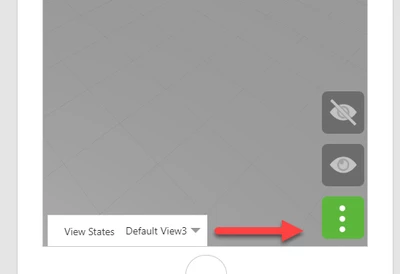
nberiwale_0-1591098491564.png


1 reply

17-Peridot
June 3, 2020

Hello Nberiwale,


You can use a such CSS style in List Widget :

.SelectSize {

 min-width: 280px;

}


Please find attached an example Project.


Best regards,

Samuel


nberiwale5-Regular MemberAuthor
5-Regular Member
June 8, 2020

Hi Samuel,


thanks for the reply.

I tried changes you suggested, they worked in a new project but are not working for the project I am working.

Even though i set the min-width as 280, the 2 columns are divided in exactly the same number of halves.

So the select box is taking only half the space on loading the experience.

I am attaching the project.  Could you please help me out.


Thanks,

Nazim

17-Peridot
June 8, 2020

Hello Nazim,


It is needed to force the size of the Column in Grid Widget.

sdidier_0-1591610739144.png


Without that, Select Widget is not displayed completly.


By the way, when using various screen size, we can see that this Select Widget is not perfectly displayed.

Some parts are outside the screen.

I suppose that it is needed to setup margin to solve that.


Best regards,

Samuel