1-Visitor
November 27, 2018
Solved

voice commands

  • November 27, 2018
  • 4 replies
  • 4879 views

hi, i am doing a hololens project. and i have bind 3D images (play button, stop button) to the animation sequence. How to i create voice commands to the 3D images. For example, by saying "PLAY" and the animation will start playing. 

Best answer by Alessio

Here's how to add voice commands to a Hololens experience:


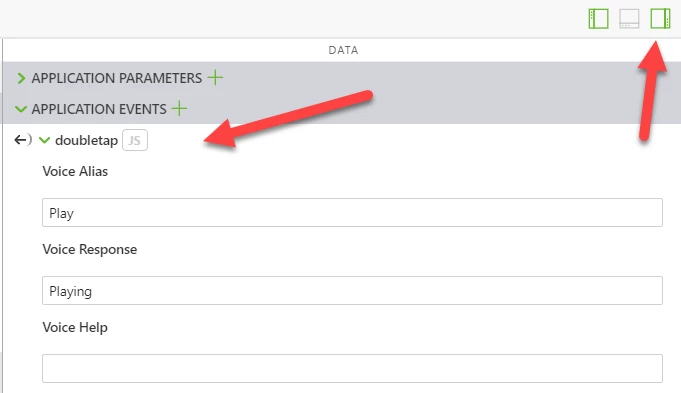
In your Vuforia Studio project open the  Data panel (the one on the far right), open APPLICATION EVENTS, expand one of them (e.g. doubletap), then you will see the following text boxes:

  • Voice Alias
  • Voice  Response


Voice CommandsVoice Commands

You type some text in the Voice Alias and that would be your voice command; upon interpreting your command, the Hololens will say the voice response message.


The Hololens will then proceed according to your binding of that event, or to execute the associated Javascript.


HTH,

Alessio

4 replies

Alessio15-MoonstoneAnswer
15-Moonstone
November 27, 2018

Here's how to add voice commands to a Hololens experience:


In your Vuforia Studio project open the  Data panel (the one on the far right), open APPLICATION EVENTS, expand one of them (e.g. doubletap), then you will see the following text boxes:

  • Voice Alias
  • Voice  Response


Voice CommandsVoice Commands

You type some text in the Voice Alias and that would be your voice command; upon interpreting your command, the Hololens will say the voice response message.


The Hololens will then proceed according to your binding of that event, or to execute the associated Javascript.


HTH,

Alessio

1-Visitor
December 12, 2018

@Alessio 

Hi, I tried to follow the steps as you previously described but when I do the binding there are no options for services


So, I'm wondering if there is additional information that I need to feed in...

Regards,

15-Moonstone
December 12, 2018

This is only valid for a AR/3D Eyewear project, not for AR/mobile projects.

Which kind of project have you created? Can you provide screenshots and Studio version?

14-Alexandrite
July 2, 2026

You can define the application event (voice command) and bind it to the service of the model widget. (no special code needed)


Hope that helps

CheerEO

Marco

16-Pearl
July 2, 2026

Hi ​@mwodarz_INNEO ,

Thank you for your answer.

However, in my Vuforia Studio (version 10.0.4), I cannot see the Application Events section in the right-hand panel. May I ask how it appears in your Studio?

When I add a Model Target or a Model widget, I can see some events, but those are widget-specific events. I cannot find the global Application Events section that you have shown in your screenshot.

Could you please guide me on how to enable or access the Application Events panel in Vuforia Studio?


14-Alexandrite
July 2, 2026

The 3 icons top right corner open/close the panels. The third icon is for the data panel that includes the application parameter


14-Alexandrite
July 3, 2026

When you start a new experience in the project list, make sure to use the 3D eyeware template

14-Alexandrite
July 3, 2026


14-Alexandrite
July 10, 2026

Then you have no voice commands (ootb). This feature is available with Vuforia View on HoloLens.