16-Pearl
August 28, 2023
Solved

Vuforia Studio - ModelItems

  • August 28, 2023
  • 2 replies
  • 1621 views

Hi Everyone,

Can anyone tell me how to drop modelItems on to the parts that are inside an assembly in Vuforia Studio

that is the part is not visible directly.


Thanks in Advance 



Best answer by sgreywilson

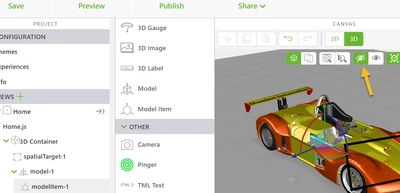
You can use the hide icon to hide selected item (basically turn on icon and click 3D model ) and then drag a model item onto the exposed model 

sgreywilson_0-1693232972939.png


del 

2 replies

16-Pearl
August 28, 2023

You can use the hide icon to hide selected item (basically turn on icon and click 3D model ) and then drag a model item onto the exposed model 

sgreywilson_0-1693232972939.png


del 

16-Pearl
August 29, 2023

Hi @sgreywilson 

Good Morning,


It did work thank you for the solution.


16-Pearl
August 29, 2023

you can also zoom in inside the model considering part is visible on which you want to drop model item and apply model item to that. just try this it will work.