15-Moonstone
August 7, 2023
Solved

Wayfinder Widget Colors

  • August 7, 2023
  • 1 reply
  • 1765 views

Hi Community

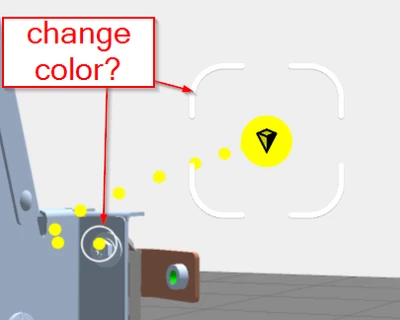
Is there a way to change the color of the reticle and the circle of the Wayfinder widget?

AlexK_0-1691395206963.png

Thanks for your help!


Best wishes

Alex

Best answer by sgreywilson

Alex,


Sorry that was a rather a quick answer  and probably  you already knew that!

Currently I don't see any way to do what you want .


Alternatively you could maybe turn off the reticule and add/move a billboard image at the end point - which again you may have thought of


$scope.addImageIndicator = function () {

let data = $scope.getWidgetProp("wayfinder-1", "waypointsData" );

positionImage( "3DImage-Indicator", data[0].position.x, data[0].position.y, data[0].position.z );
}


positionImage = function (image , x,y,z) {

$scope.view.wdg[image].x = x;
$scope.view.wdg[image].y = y;
$scope.view.wdg[image].z = z;


}

1 reply

16-Pearl
August 7, 2023

sgreywilson_0-1691421023710.png


AlexK15-MoonstoneAuthor
15-Moonstone
August 8, 2023

Hi Steve


Thanks for your reply. I want to change the white color of the reticle and the circle, not the ribbon.


Best wishes


Alex

16-Pearl
August 8, 2023

Alex,


Sorry that was a rather a quick answer  and probably  you already knew that!

Currently I don't see any way to do what you want .


Alternatively you could maybe turn off the reticule and add/move a billboard image at the end point - which again you may have thought of


$scope.addImageIndicator = function () {

let data = $scope.getWidgetProp("wayfinder-1", "waypointsData" );

positionImage( "3DImage-Indicator", data[0].position.x, data[0].position.y, data[0].position.z );
}


positionImage = function (image , x,y,z) {

$scope.view.wdg[image].x = x;
$scope.view.wdg[image].y = y;
$scope.view.wdg[image].z = z;


}