


Question
Getting Started: How To Start a Topic (or Ask a Question)
To Start a Community Topic (or Ask a Question):
- On the community main page, click “Create a topic”.

- You will be prompted to a new page. Make sure “Question” is selected in order to post a topic.
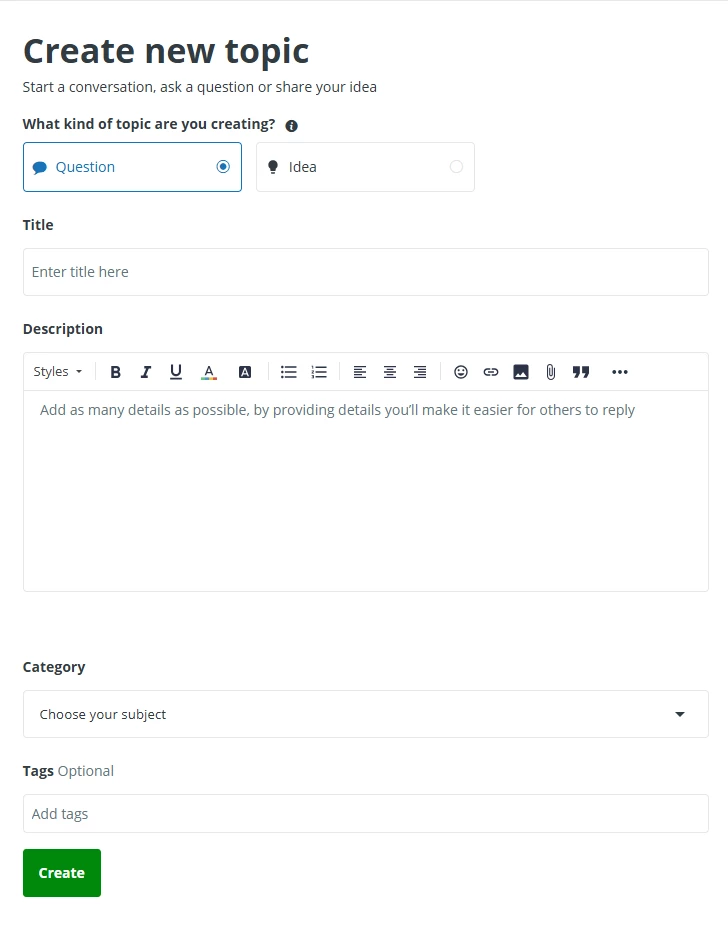
- Enter a meaningful subject title that will yield good search results. Under “Category” choose the board where you want to post your question. Make sure to add a “Tag” to your topic. These help classify what your topic or question is about
- Write the content of your message using the toolbar options and add an attachment as needed.
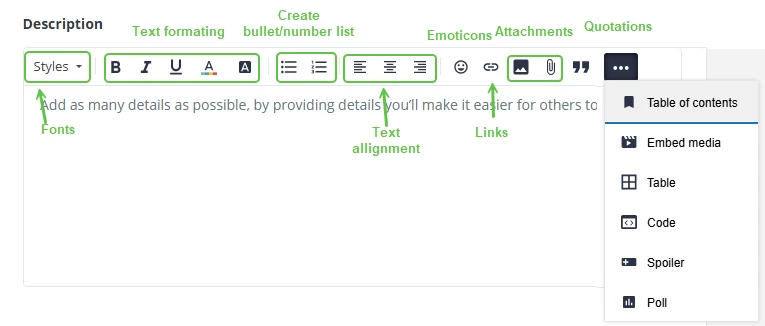
Note: Some popular toolbar options are shared on the screenshot below. You can also "scroll over" to see what these icons represent.
6. Click “Create”
Note: once published, you will be able to edit your post for 1h. Beyond 1h, if you wish to correct something, you may post a reply to your message or notify the moderator. We typically want to avoid extensive changes to the history of a conversation to preserve its integrity.
Last edited by Catalina, April 2026