

Community Manager
November 4, 2017
Question

How to delete Private Messages

  • November 4, 2017
  • 1 reply
  • 4319 views

To delete a private message, follow these steps:


1.  Choose your conversation and click “Show conversation”.
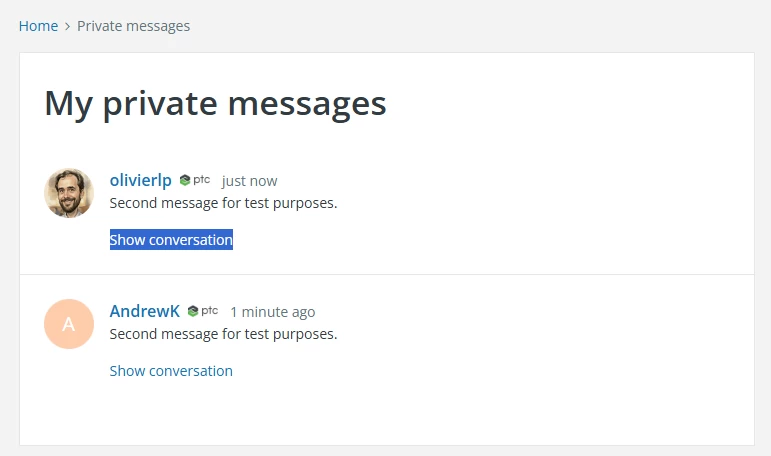
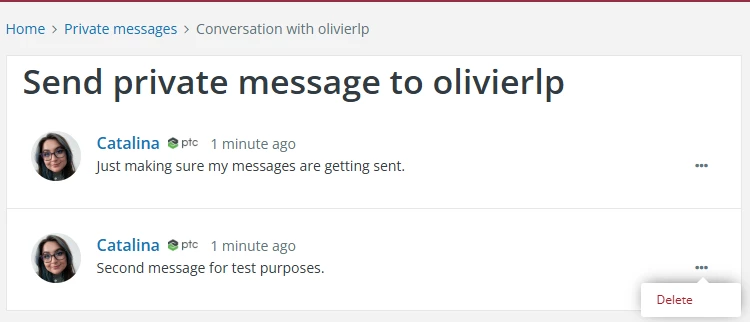
  1. On the conversation, hover with your mouse over the 3 dot drop-down menu on the message you want to delete and click “Delete”.
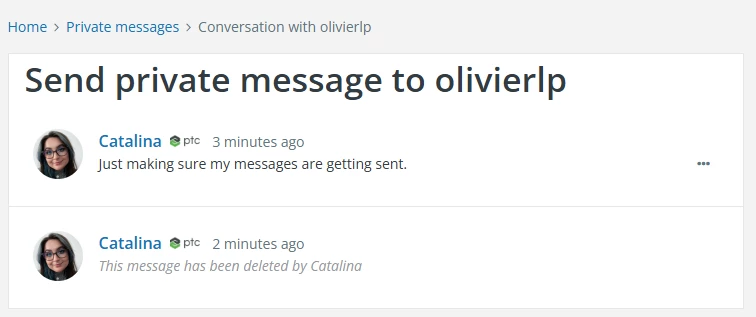
  1. It will then show it has been deleted by you.
Last edited by Catalina, April 2026

1 reply

23-Emerald IV
November 6, 2017

@Jaime_Lee,

It would probably help a lot if the links were clearly shown as links.  It's not obvious that the subject of the message is clickable if you don't happen to move the mouse right over it. Maybe underline it, make it bold, or do something else to indicate that it's actually a link.

Jaime_LeeCommunity ManagerAuthor
Community Manager
November 6, 2017

@TomU _Please put this suggestion under Community Feedback.  I WHOLE HEARTEDLY AGREE!


Thank You!