
12-Amethyst
Jan 12, 2024 8:05 PM UTC
Solved

A Newbie Question About New File Attributes

When I drag and drop a file to my Windchill Documents folder using Windows File Explorer, the following Windchill Desktop Integration pop-up window prompts me to associate attributes with this newly introduced file.

One of the attributes on which the pop-up seeks guidance is file name.  My first reaction is "the file name is obvious: the name of the file I just dragged in".

But then I realized that Windchill is probably giving me an opportunity to rename the dragged-in file to something else, so I renamed the file to something else.
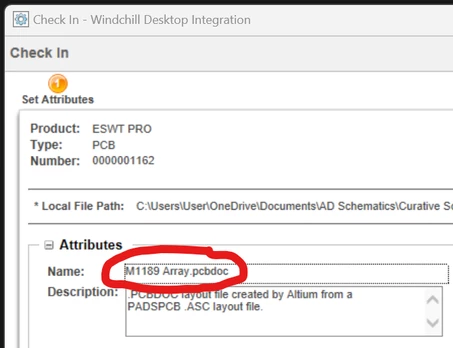
jimolson_1-1705089101512.png


But afterwards if I hover the cursor on the newly-added file using Windows File Explorer (which should give me the file's complete path including the file extent) I see my old file name, not the modified name.

So my question is: why does the File Attributes pop-up give me an opportunity to rename a file if Windchill plans to retain the old file name?  Why would Windchill try to manage dual file names for the same file?

jimolson_0-1705088859719.png


jimolsonAnswer
12-Amethyst
Jan 12, 2024 9:19 PM UTC

Thanks, avillanueva.  That's what I guessed. 

To parrot back what you just wrote:  the prompt for Name: in the pop-up window is actually a request to name the managed object.  There is a rebuttable presumption that the object's name is the file's name, but this need not be so. 

If I wish to name the file's Windchill-managed object something different from the file name, I can specify the object name.

2 replies

avillanueva
23-Emerald II
Jan 12, 2024 9:13 PM UTC

Its the file name but its the object name. They can be different. The default copies the filename into the name field but trust that the filename is a different attribute associated to the primary content.  If you look at this in the web browser and its details page, you will see what I mean. For example, say I have a document filename called myanalysis.xlsx. I drop in but I want it to have a document number G55-9987 and name would be "Structural Analysis of Rocket Fairing". Name you are seeing is like a descriptive name or document title if you prefer.

Translate
jimolson12-AmethystAuthorAnswer
12-Amethyst
Jan 12, 2024 9:19 PM UTC

Thanks, avillanueva.  That's what I guessed. 

To parrot back what you just wrote:  the prompt for Name: in the pop-up window is actually a request to name the managed object.  There is a rebuttable presumption that the object's name is the file's name, but this need not be so. 

If I wish to name the file's Windchill-managed object something different from the file name, I can specify the object name.

Translate