8-Gravel
December 3, 2025
Solved

Accessing DXF files after publishing via CAD worker

  • December 3, 2025
  • 1 reply
  • 350 views
I am using Windchill PDMLink Release 13.0 and Datecode with CPS 13.0.1.0

I'd like to ask if it is possible to access .dxf files that were published / created by the CAD worker? Can they all together be found in some folder respectively is there any chance to extract all of them to a local drive?

    Best answer by avillanueva

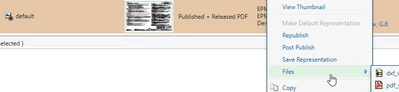
    I would check your publishing rules but odd that you can see PDF but not DXF in submenu. Here is what my rules produce on Release of a drawing:

    avillanueva_0-1765290929004.png

    I've seen configuration where folks like to put additional published content outside of the representation so it would appear on the main page in attachments section. Navigate does not care where the files are as it can search all of it.  How many representations do you have?

    1 reply

    avillanueva
    23-Emerald I
    23-Emerald I
    December 9, 2025

    They are accessible on the representation section under Content tab. Right click on the representation and you should see a submenu called files. They should be listed there and you can download the file that way. All of this content typically goes into the vaults and is not accessible directly if that is what you are asking. 


    If you download or save the representation as a .pvz, it is essentially a zip file. Extracting that locally, you should see the dxf file there. Another option is to use a package, grab a bunch of items to create the package zip for download. The .pvz representations are there also as zips within zips. 


    Thingworx Navigate can be configured to access the related content including these published files. We ended up creating our own custom app for extracting content to a zip download based on a list of numbers input. Short answer, possible yes. Some things might require some work or customization to extract in mass. 

    uklemme8-GravelAuthor
    8-Gravel
    December 9, 2025

    Hi,


    thanks for your reply. You are right: The perfect thing would have been to really locate them in a vault directory and collect them somehow.


    From my perspective the publish rule says that both pdf and dxf are being published. The WVS monitor reports a successful creation of the dxf. But we are not seeing them in the submenu "files"; there we only have the published .pdf file. And to add one more funny thing: in Navigate we see both pdf and dxf. Is it possible that this is the result of different publish rules which are executed at certain events? 

    avillanueva
    23-Emerald I
    23-Emerald I
    December 9, 2025

    I would check your publishing rules but odd that you can see PDF but not DXF in submenu. Here is what my rules produce on Release of a drawing:

    avillanueva_0-1765290929004.png

    I've seen configuration where folks like to put additional published content outside of the representation so it would appear on the main page in attachments section. Navigate does not care where the files are as it can search all of it.  How many representations do you have?