
10-Marble
December 20, 2023
Question

Accidentally Deleted Family Table Instance in CREO PTC 7.0 - Error: CAD Part XXXXXXX is not unique

  • December 20, 2023
  • 2 replies
  • 4194 views

Hello PTC Community,


I am encountering an issue while attempting to restore a Family Table instance in CREO PTC, and I'm seeking your valuable assistance in resolving this matter.


I was in the process of cleaning up a Family Table containing 30 instances, intending to delete half of them as they were no longer in use. My usual method involved opening each instance, deleting the respective row in the family table, saving the generic, and then removing the instance from the workspace.

However, during this cleanup process, I accidentally selected and deleted a row that I wanted to retain. Though I did not delete it from the workspace, I did save the generic afterward.


In an attempt to restore the mistakenly deleted instance, I tried adding it back using a copy of the family table stored on my desktop. Unfortunately, I encountered an error message stating "CAD Part XXXXXX is not unique."


Relevant Context:

  • I'm currently using 7.0.10.0 with GENIUS TOOLS.
  • The deleted instance appears in a different workspace, but it cannot be opened.
  • Instance drawing still exists but cannot be opened.

Attempts to Solve:

  • I've tried adding the instance back using a copy of the family table stored on my desktop, which resulted in the problem stated above.
  • The deleted instance still exists but cannot be opened.
  • I cannot check-in or undo check-out the Family Table due to the conflict, presumably because the drawing still exists.
  • Found this article which may help my problem but cannot open it since I'm not subscribed to PTC.


Thank you in advance for your time and expertise in helping me resolve this issue. If further details or files are required for better understanding, please let me know, and I'll provide them promptly.
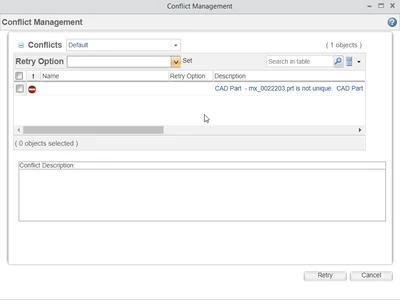
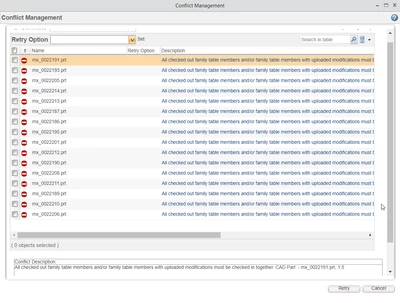
MS_10621981_0-1703094817984.png

MS_10621981_1-1703094874581.png


2 replies

23-Emerald III
December 20, 2023

Rule # 1 for dealing with Family Tables: NEVER delete an instance once the table has been saved.


Can you retrieve an older copy of the generic file, before you violated Rule #1?


MSALAS10-MarbleAuthor
10-Marble
December 20, 2023

How can I retrieve an older copy of the generic model?

Should I do it in a different Workspace (even if I can't check-in the generic) and look for the second-to-last version?

I didn't know that valuable rule. I won't break it ever again.


Edit:

I added the second-to-last generic model to a different workspace and now the model that I deleted it by accident is showing along with the ones that I don't want. What should I do now?

All of them have the out-of-date symbol.

avillanueva
23-Emerald I
23-Emerald I
December 20, 2023

Go to the History tab of that generic. Select the iteration that had the deleted instance. From its page, you can add to the workspace. You will get a conflict saying its already there but you can resolve that and the older iteration will be downloaded.

avillanueva
23-Emerald I
23-Emerald I
December 20, 2023

Was the generic checked back in yet? If so, its gets more complex. Based on what you are saying it appears like you did. Ok, here is what you are seeing. If you have  a drawing that uses the instances that are deleted, its causing a conflict since its pulling the latest generic which does not have that instance. The epmdocument of that deleted instance is left behind so you would need the out of date generic in the workspace to be able to retrieve it.  This is why its often a good idea to never delete instances if they are checked into Windchill.  You can add older iterations of the generic to a workspace. Long term, you need to restore that instance which the article will walk you through.

MSALAS10-MarbleAuthor
10-Marble
December 20, 2023

I wasn't able to check-in the generic, It's still checked-out.

Could you walk me through what the article says while my company solves the issue to upgrade my PTC account?

Thank you for your reply!

23-Emerald III
December 20, 2023

Since what you have is not what you want to end up with, do the following.

  1. Remove all of the instances and generics from your workspaces
  2. Create a new workspace
  3. Add the 1.4 version of your generic to the workspace (You may need to modify your Windchill preferences to allow this)
  4. Check it out (You may need to modify your Windchill preferences to allow this)
  5. Make a minor change to the generic that forces a verify on ALL instances
  6. Save and check in the generic (Should be version 1.6)
  7. Make any changes as need to your family table (and remember Rule #1!)