
1-Visitor
March 21, 2024
Solved

After installation, unable to view or edit the lifecycle or workflow templates.
  • March 21, 2024
  • 1 reply
  • 1657 views
I am using Windchill PDMLink Release 11.0 and Datecode with CPS M030-CPS11

After installation, unable to view or edit the lifecycle or workflow templates.
    Best answer by Sarathkumar_M

    Hi 

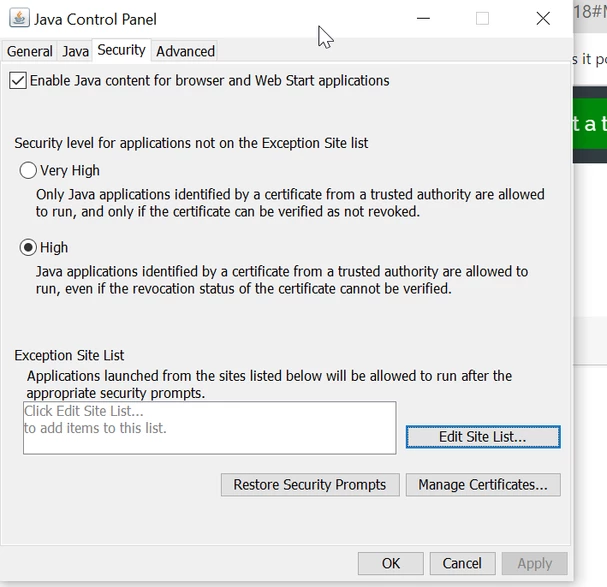
    first you need check java installed on that machine, if not working, try open the configure java  then security tap add your windchill host URL link and close, then try to open workflow and lifecycle , I'm sure it will work.


    Sarathkumar_M_0-1711463297876.png


    Try and let me know 

    Thanks & Regard

    Sarathkumar M


    1 reply

    avillanueva
    23-Emerald I
    23-Emerald I
    March 21, 2024

    Is anything else going on? Are you the admin? Are you part of the Lifecycle or Workflow Admin group at site level? Make sure you License is not View and Print also.

    avillanueva_0-1711028573171.png


    1-Visitor
    March 21, 2024

    Recently I have installed windchill 11.0 MO30 CPS11 in my laptop. Installation is successful but cannot create new lifecycle or workflow template and cannot view or edit them. 

    While clicking on create new template or edit or view, it's showing like below screenshot.


    Yes, I am part of admin.


    avillanueva
    23-Emerald I
    23-Emerald I
    March 21, 2024