
17-Peridot
August 11, 2025
Solved

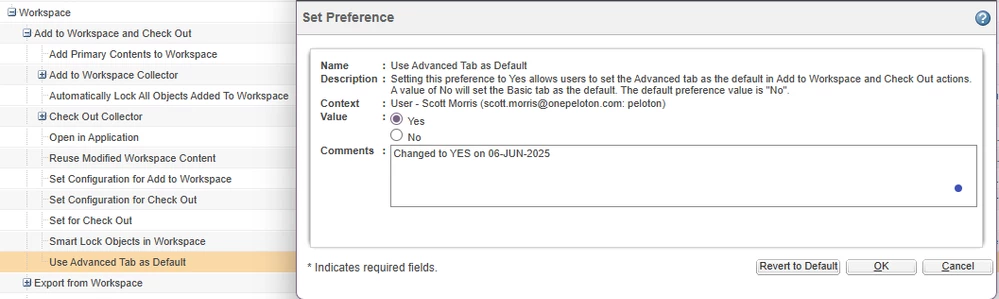
Anyone using the Workspace, Use Advanced Tab as Default preference = YES for CAD Data Management?

  • August 11, 2025
  • 2 replies
  • 648 views

Version: Windchill 12.0


Use Case: I would like to know if others are using the Workspace, Use Advanced Tab as Default preference = YES for CAD data management in Windchill.


Description:

The preference WorkspaceUse Advanced Tab as Default = YES appears to be a great option for CAD users to understand exactly what is being added to their workspace. I have never enabled this for Creo users, but I'm curious to know if folks using other CAD solutions, such as Solidworks, are using this preference and whether or not it had a positive impact for users to understand what is being added to the workspace. 


I'd like to provide more information about what is related to what in Windchill and ensure users are getting all the right models, drawings and parts in the process. 
 

ScottMorris_0-1754918194458.png


Best answer by joe_morton

We use Creo. We've had that setting set to "Yes" from either our initial Windchill setup, or shortly thereafter. Our users are completely used to it.. they don't know any different.

2 replies

avillanueva
23-Emerald I
23-Emerald I
August 11, 2025

I typically do no have this enabled for speed purposes. It takes extra time to render that page. The only time I show folks this is when they are questioning a publishing job and how it does not match what they see in Creo. In the Advanced tab, you can toggle between latest and as-stored noting what is different. I think it should be part of training but for day to day, use defaults.

joe_morton
18-Opal
18-Opal
August 11, 2025

We use Creo. We've had that setting set to "Yes" from either our initial Windchill setup, or shortly thereafter. Our users are completely used to it.. they don't know any different.