15-Moonstone
January 5, 2023
Solved

Assigning workflow tasks to roles

  • January 5, 2023
  • 5 replies
  • 2670 views

I want to send a task to the manager of that department according to the selected department. Is there any way I can assign this user directly without getting it from the form?

Best answer by HelesicPetr

Hi @smcvr 

If you solve the mapping what user is in the selected department you can find a user and assign him to a workflow role and the role use in the task,


you need to find a team and a role from a object the workflow is related

Add the participant(user) to the role. 

example from Change Task object
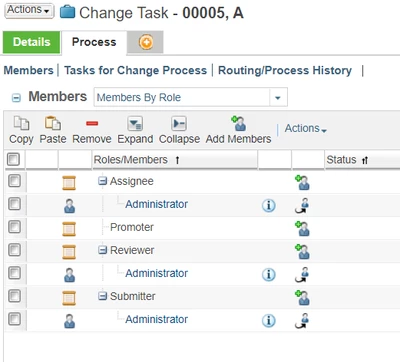
HelesicPetr_0-1672989782316.png


generally example API to add a participant to a role is > 

wt.project.Role teamRole = wt.project.Role.toRole(roleName); // roleName is a internal name of role what you want to update
wt.org.WTPrincipalReference princRef = null; // you need to find your user and get WTPrincipal object in my case I have a WTPrincipalReference and from this object I fet WTPrincipal - just for explanation PS: WTPrincipal is a root type of WTUser
wt.maturity.PromotionNotice targetObject = (wt.maturity.PromotionNotice)primaryBussinessObject; // from workflow primaryBussinessObject can be any Change Object Promotion, ChangeRequest, Activity, Notice 

wt.team.Team team = (wt.team.Team) targetObject.getTeamId().getObject();
wt.team.TeamHelper.service.addRolePrincipalMap(teamRole, princRef.getPrincipal(), team);

 Adding user to a role has to be done before a workflow task is run.


Hope this explanation can help


PetrH

5 replies

HelesicPetr
22-Sapphire II
January 6, 2023

Hi @smcvr 

If you solve the mapping what user is in the selected department you can find a user and assign him to a workflow role and the role use in the task,


you need to find a team and a role from a object the workflow is related

Add the participant(user) to the role. 

example from Change Task object

HelesicPetr_0-1672989782316.png


generally example API to add a participant to a role is > 

wt.project.Role teamRole = wt.project.Role.toRole(roleName); // roleName is a internal name of role what you want to update
wt.org.WTPrincipalReference princRef = null; // you need to find your user and get WTPrincipal object in my case I have a WTPrincipalReference and from this object I fet WTPrincipal - just for explanation PS: WTPrincipal is a root type of WTUser
wt.maturity.PromotionNotice targetObject = (wt.maturity.PromotionNotice)primaryBussinessObject; // from workflow primaryBussinessObject can be any Change Object Promotion, ChangeRequest, Activity, Notice 

wt.team.Team team = (wt.team.Team) targetObject.getTeamId().getObject();
wt.team.TeamHelper.service.addRolePrincipalMap(teamRole, princRef.getPrincipal(), team);

 Adding user to a role has to be done before a workflow task is run.


Hope this explanation can help


PetrH

smcvr15-MoonstoneAuthor
15-Moonstone
January 9, 2023

How can I get the WTPrincipal object?


HelesicPetr
22-Sapphire II
January 9, 2023

Hi @smcvr 

for example 


String userName ="admin";
WTUser wtUser = null; //WTUser is subClass of WTPrincipal
		try
		{
			QuerySpec queryspec;
			queryspec = new QuerySpec();
			int wtUserObjectInt = queryspec.appendClassList(WTUser.class, true);

			CompositeWhereExpression andCondition = new CompositeWhereExpression(LogicalOperator.AND);
			andCondition.append(new SearchCondition(WTUser.class, WTUser.NAME, SearchCondition.LIKE, userName), new int[]{wtUserObjectInt});

			queryspec.appendWhere(andCondition, new int[]{wtUserObjectInt, wtUserObjectInt});

			QueryResult resultQuery = PersistenceHelper.manager.find((StatementSpec) queryspec);

			if (resultQuery.hasMoreElements())
			{
				Object obj[] = (Object[]) resultQuery.nextElement();

				wtUser = (WTUser) obj[0];
			}
		} catch (WTException e)
		{
			e.printStackTrace();
		}


PetrH
