
12-Amethyst
June 15, 2017
Question

Auto associate Parts to CAD Documents checkbox

  • June 15, 2017
  • 2 replies
  • 2061 views

HI All,

By default 'Auto Associate Parts to CAD Documents' checkbox is always enabled in Workgroup Manager during Check-in. But, user can manually uncheck the option. Is there a way to lock this preference from editing?
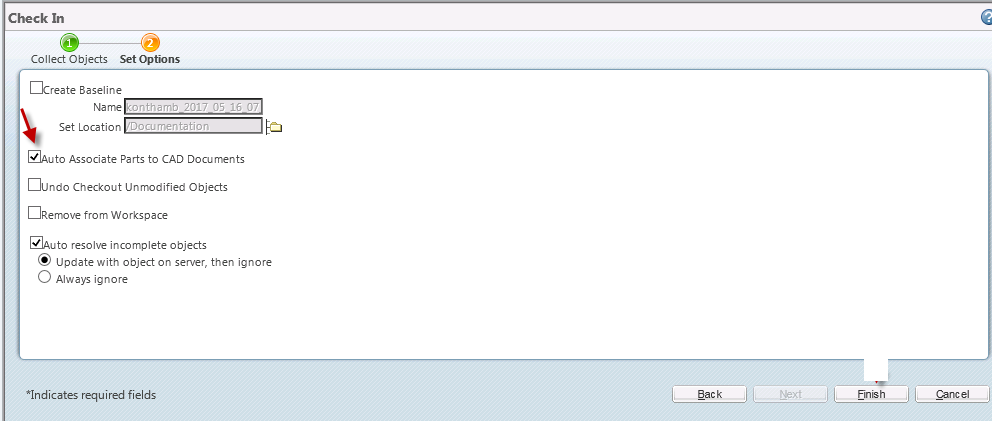
Preference.png

2 replies

1-Visitor
June 19, 2017

At the SITE, ORG, PRODUCT or LIBRARY, go to the utilities page and then preferences. Find Operation>Checkin Operation>Auto Associate upon Check In. Edit it set the preference to the desired value, check the "Locked" box, and press OK. All children under whatever level you set it at will be locked.

2017-06-19 15_21_46-Set Preference.png

14-Alexandrite
March 11, 2025

Hi @cmilligan , tagging onto your post, Do you happen to know if we can set and lock a preference at the context level with say "Yes" but then lock that same preference at the Org with "No".

It seems that when I do that, the Org "No" overwrites my preference selection at the context level.

Thanks,

Ladric

June 22, 2017

Hello Bhagirath

This can be done only by Org Admin or site admin and not possible by the end users.

Please contact you Windchill admin/Support team .

Regards

Gagan D