Hello Guru
Follow the below steps
For example if you want to download the parts
| 4117051AD01.PRT |
| 4117051AD01.PRT |
| 4117051AD01_C2.PRT |
| 4117051B0.PRT |
| 4117051B001.PRT |
first you need to add * and ; at the suffix ie
| 4117051AD01.PRT*; | 4117051AD01.PRT*; | 4117051AD01_C2.PRT*; | 4117051B0.PRT*; | 4117051B001.PRT*; |
If you already know the full number * is not required , you can do this in excel by using concatenate option .
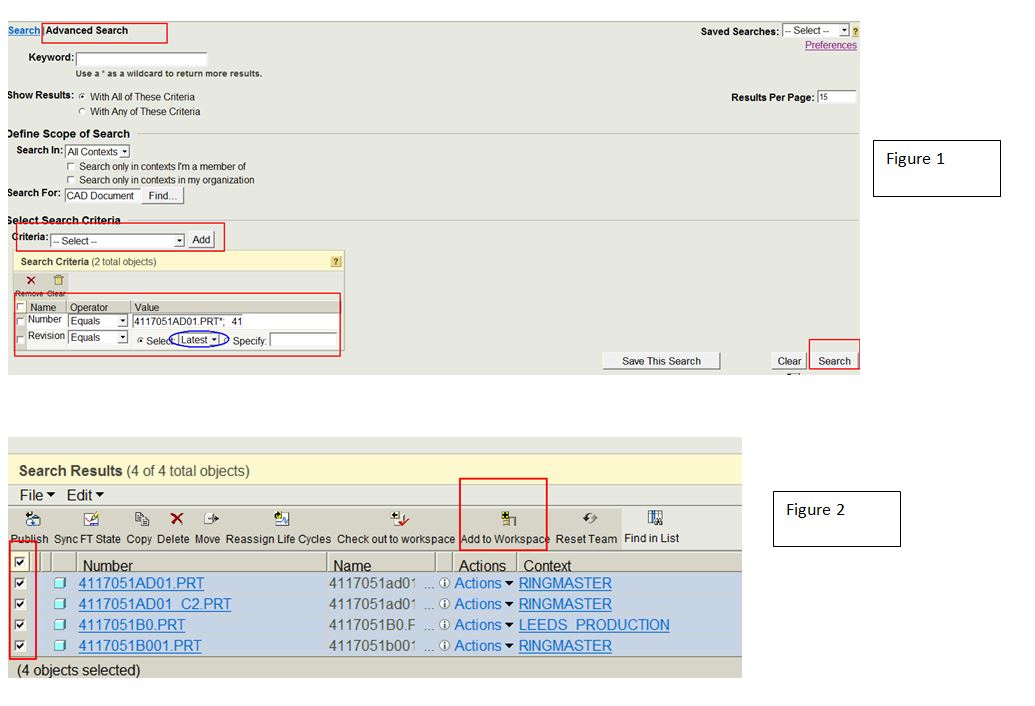
>Then go to advance search window then add two filters 1.Name/file name/number (depends) and
2. revision
>In the revision select the latest and clink on search (Refer figure 1-attached screenshot)
Note :it may take time to search depending on the number of search result
>Then select all the drawing from the check-box and lick on add to work space
once all the drawing in added to your work space ,you can export those drawings to you local System under Tools>Export from work-space> option
Try this and let me know how it goes ,if required we can have remote session and then discuss
Best regards

