

6-Contributor
May 5, 2025
Solved

Bulk download PDFs from a change summary?

  • May 5, 2025
  • 1 reply
  • 1206 views

Version: Windchill 13.0


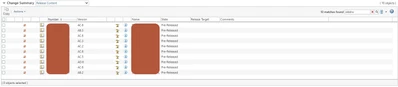
Use Case: Referencing the screenshot, I'd like to just be able to click the box and have a "download all" action.


Description:

Hello PTC community, I want to apologize if this is beating a dead horse. I've looked at a bunch of different posts regarding this issue or similar ones, but I can't figure out what the actual solution is.  This is a relatively tame change summary, but for the ones with multiple hundred parts I would prefer to not download each one by one. Ideally, I could even pick a general version, but I won't be that picky. Does anyone know of a simple solution (that's trusted) to achieve this?

ptcscreenshot.PNG

Best answer by avillanueva

I am assuming based on the screenshot, you are using SolidWorks and have PDFs being automatically generated as part of the visualization publishing? Or are they attachments to the CAD objects? OOTB, based on the change notice might be a bit limited. Have you tried using the Clipboard? All the object shown can be copied to the clipboard (Copy option) and then from there batch printed (to PDF) from Creo View. 

Other than that, we are deploying our own solution that will export content to a zip via a Thingworx Navigate App. If the user enters a CN number, it retrieves all content on resulting objects. 

1 reply

avillanueva
23-Emerald I
23-Emerald I
May 5, 2025

I am assuming based on the screenshot, you are using SolidWorks and have PDFs being automatically generated as part of the visualization publishing? Or are they attachments to the CAD objects? OOTB, based on the change notice might be a bit limited. Have you tried using the Clipboard? All the object shown can be copied to the clipboard (Copy option) and then from there batch printed (to PDF) from Creo View. 

Other than that, we are deploying our own solution that will export content to a zip via a Thingworx Navigate App. If the user enters a CN number, it retrieves all content on resulting objects. 

6-Contributor
May 6, 2025

I am unsure exactly how we are generating the PDFs. How do I batch print to Creo View? I am able to copy them all but I don't see an option to export the clipboard contents anywhere.