

13-Aquamarine
February 5, 2020
Solved

cache associated with frames cannot be deleted until frames are deleted

  • February 5, 2020
  • 1 reply
  • 2045 views

I'm trying to delete cache for my workspaces. But I'm getting this message window 'cache associated with frames cannot be deleted until frames are deleted' and aborting the cache clearing. 

What is this Frames?

How to override this frames to clear the cache?
Best answer by TomU

Frames are like snapshots of how the workspace looked at a certain point in time.  You can roll back to them to undo recent changes or recover something that was deleted.  You can see these, and delete them if so desired, from the 'Event Management' page.


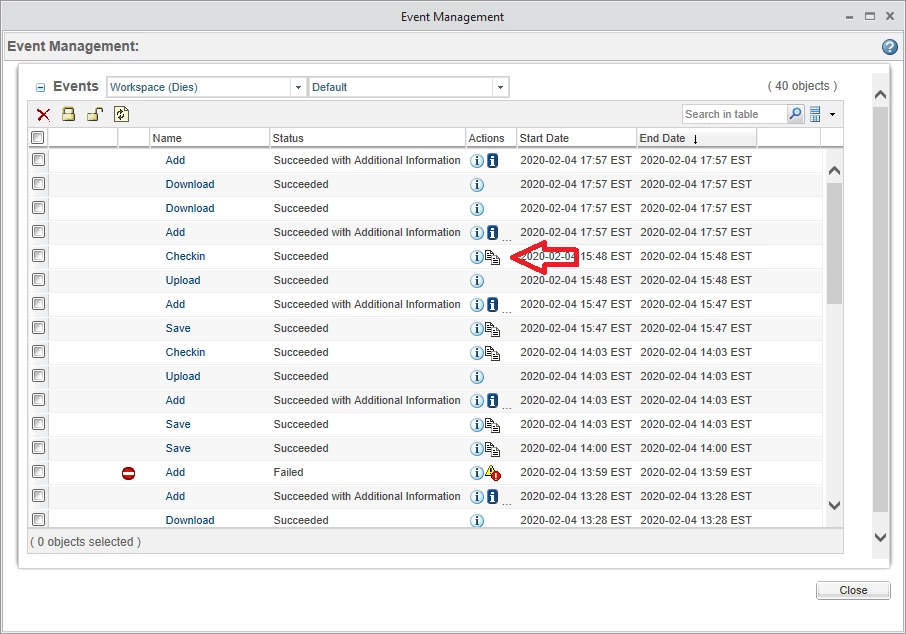
There are multiple ways to access the event management page.  From Creo Parametric it would be File --> Manage Session --> Event Management --> Server Name.  You should see a window like the one below.  The rows with the paper icons are the frames.


TomU_1-1580915088570.png


More information is available in the help documentation:

https://support.ptc.com/help/wnc/r11.2.1.0/en/#page/Windchill_Help_Center%2FCADxSrvrWspOviewFramesAbout.html%23


1 reply

TomU23-Emerald IVAnswer
23-Emerald IV
February 5, 2020

Frames are like snapshots of how the workspace looked at a certain point in time.  You can roll back to them to undo recent changes or recover something that was deleted.  You can see these, and delete them if so desired, from the 'Event Management' page.


There are multiple ways to access the event management page.  From Creo Parametric it would be File --> Manage Session --> Event Management --> Server Name.  You should see a window like the one below.  The rows with the paper icons are the frames.


TomU_1-1580915088570.png


More information is available in the help documentation:

https://support.ptc.com/help/wnc/r11.2.1.0/en/#page/Windchill_Help_Center%2FCADxSrvrWspOviewFramesAbout.html%23