
4-Participant
May 2, 2024
Question

CAD structure in Windchil

  • May 2, 2024
  • 2 replies
  • 2047 views

Version: Windchill 12.1


Use Case: Trying to get the correct CAD Structure in Windchill for the previous Released iterations of the CAD documents and want to use these CAD documents in other projects.


Description:

Hello All,

We are using CREO 9.0 and Windchill 12.1, we do not use WT part in Windchill and just work with CAD documents.

The issue is if I open a previous Released iteration of a CAD Assembly, the structure is not showing the previous iterations of the downstream sub-assemblies, rather it shows the latest version of all downstream items. For example see the image below,
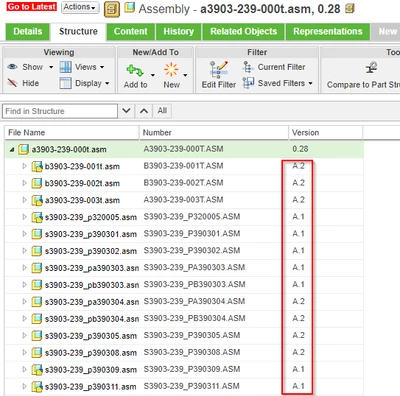
Pranav_p2_0-1714642935992.png


In the structure, the top level asm is last Released  0.28 version but all other underlying items are latest Revised version A. 

Also if I open it in CREO it shows some red flags for missing references due to updates after revision.

Does anyone know how to get the same iteration of all downstream items when it was last Released together with top level along with the references? Is there any preference option that I need to change to get this?


Kind Regards

Pranav


2 replies

HelesicPetr
22-Sapphire II
22-Sapphire II
May 2, 2024

Hi @Pranav_p2 

Usually if you work just with CAD then the filter "as stored" should work for you if your change process works properly

The preference filter as matured works really just for WTParts because there is not option for as stored configuration. 

HelesicPetr_0-1714648538564.png


PetrH. 

Pranav_p24-ParticipantAuthor
4-Participant
May 2, 2024

Hi @HelesicPetr 

Thank you for your comment.

How can I apply the filter 'as stored' to all CAD documents in database or how can set it 'as stored' by default? 


Warm regards

Pranav

HelesicPetr
22-Sapphire II
22-Sapphire II
May 2, 2024

Hi @Pranav_p2 

Your requirement is not possible now.

The Users have to be trained to use the filter with "As store" configuration. 

PetrH

Community Manager
May 8, 2024

Hello @Pranav_p2


It looks like you have some responses from a community member. If any of these replies helped you solve your question please mark the appropriate reply as the Accepted Solution. 

Of course, if you have more to share on your issue, please let the Community know so other community members can continue to help you.

Thanks,
Community Moderation Team.