
17-Peridot
September 23, 2024
Solved

CAD worker CAD software update makes worker not auto-start

  • September 23, 2024
  • 3 replies
  • 3049 views

Version: Windchill 12.0


Use Case: NX CAD worker (on VM). Just updated NX and went through the recipe and adapter files to confirm everything matches (ugworker.bat, ugstartup.bat, etc.) CAD worker fails to start from Worker Agent (monitor comes on). If I turn off the monitor there and manually launch ugworker.bat, everything works fine.


Description:

I updated my NX version on the CAD worker. 

The worker now doesn't start up automatically. The monitor starts but in the worker log there's a 8 INIT error. When I turn off the monitor and manually run the ugworker.bat file everything works fine. 


When I did the upgrade, I updated the ugworker and ugstartup files to reflect the correct NX version. Not sure what broke the auto-start... but I'm sure it's something silly. 


What did I miss? 
Best answer by Dobi

Found the issue!

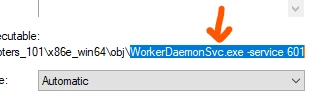
Each worker has it's own Worker Daemon and port (CS49182) but for whatever reason, the NX worker was using the WorkerDaemon Service executable with the 9.0 adapter version instead of just the Worker Daemon. 

Dobi_0-1727272604507.png

Once I edited the service to remove the xxSVC, the worker fired right up. 

3 replies

15-Moonstone
September 23, 2024

launch adapter.pvi located in worker configuration directory (or launch command prompt, call <adapter_install_dir>\bin\pvilauncher.exe adapter.pvi), update NX version to one you installed on machine and click on setup. Revalidate your recipe files and other configurations like -su argument in ugworker.bat and ugstartup.bat availability. 


I hope this shall work for you. 

Dobi17-PeridotAuthor
17-Peridot
September 23, 2024

@vdegaonkar i went through those steps after the software upgrade and confirmed that ugworker.bat and ugstartup.bat are correct. 

Unfortunately, that doesn't work. 


From the worker agent, the monitor comes on but the worker fails to start. 

From the worker itself, if the monitor is turned off I can start the ugworker.bat and everything works fine. 


I'm thinking there's some sort of pointer or typo somewhere. 

HelesicPetr
22-Sapphire II
22-Sapphire II
September 24, 2024

Hi @Dobi 

Try to configure the worker as new one. 

Sometimes I copied the original config and I thought it should have been same but it wasn't

PetrH

12-Amethyst
September 24, 2024

Hello @Dobi ,


Go to Worker Agent Administrator -->Configure--> Select the Worker--> Edit Worker-->Step 5 Wizard Page--> Enable Auto Start.


Thanks & Regards

Shashwath Shetty


Dobi17-PeridotAuthor
17-Peridot
September 24, 2024

@Shashwath that's not it. Auto start is on already and the worker agent side of the configuration hasn't changed since I updated the Adapter version 6 months or so back. 

Dobi17-PeridotAuthor
17-Peridot
September 24, 2024

Plot thickens (a little bit). 

I have 3 NX CAD workers. Two of those are on VMs that also run Creo. 

This particular one that is now not autostarting was working great along with one of the other systems that ONLY has the NX worker. 


The other NX CAD worker on a shared VM with Creo is also not autostarting with the 10.1 adapters. ðŸ¤”

Dobi17-PeridotAuthorAnswer
17-Peridot
September 25, 2024

Found the issue!

Each worker has it's own Worker Daemon and port (CS49182) but for whatever reason, the NX worker was using the WorkerDaemon Service executable with the 9.0 adapter version instead of just the Worker Daemon. 

Dobi_0-1727272604507.png

Once I edited the service to remove the xxSVC, the worker fired right up.