17-Peridot
February 28, 2023
Solved

CAD worker fails with "Save of file failed" error

  • February 28, 2023
  • 9 replies
  • 2754 views

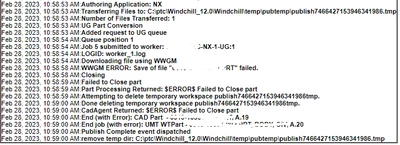
Finally got a new error in the CAD worker:
Dobi_0-1677607894878.png

I am able to add to workspace and open the file in question with no issues on my system. 

Has anyone seen this one before?



Best answer by Dobi

After a tech support call, reinstall of WGM and confirming that everything ought to be working: the issue was with the particular file. After the first failure, though, NX was not able to recover on that machine and the subsequent jobs failed. 


There is a known issue (apparently) with CreoView Adapters and NX files that are renamed or Saved As from existing that may have been at play here but while on the call with tech support we weren't able to replicate the issue with a different file that was renamed. 

9 replies

avillanueva
23-Emerald I
February 28, 2023

I have little experience with UG WGM and publishing that that CAD system. Couple of things to try, some of them obvious:

  • Is it all jobs or just this data set?
  • Space full?
  • Access rights on publisher?
  • Could this be due to a rename event where the WGM tries to sync but conflicts with another file in that set?
Dobi17-PeridotAuthor
17-Peridot
February 28, 2023

I had 3 files that showed up with this error this morning. I was able to get all of them opened with no issues on my end. On Friday I had a bunch of "failed to sync" errors.  CS346131 suggested to clean up the .wf and .ws folders and things have been working since then. Then this "failed to save" showed up. I did the same .wf and .ws wipes and was able to get things republished. 


Not sure what would cause this. 


avillanueva
23-Emerald I
February 28, 2023

I often "reset" worker files, purging old files and clearing workspace. Don't forget the FTP root folders. Is it working again?

Dobi17-PeridotAuthorAnswer
17-Peridot
March 7, 2023

After a tech support call, reinstall of WGM and confirming that everything ought to be working: the issue was with the particular file. After the first failure, though, NX was not able to recover on that machine and the subsequent jobs failed. 


There is a known issue (apparently) with CreoView Adapters and NX files that are renamed or Saved As from existing that may have been at play here but while on the call with tech support we weren't able to replicate the issue with a different file that was renamed. 

13-Aquamarine
June 5, 2023

Can you elaborate on the issue regarding CVA, NX, and renamed files, please? We're also seeing the same behaviour from time to time. It would be interesting to dig a little deeper and see if we could find a viable workaround or best practice for files we're renaming or using save as on. Do you know if it has an SPR or Article related to it that I may look further into?

To us it seems like it may be instability on the worker since a resubmit of the same (failed) job later some times complete successfully. 

Dobi17-PeridotAuthor
17-Peridot
June 7, 2023

It's a bit vague still... but I'll do my best:

The end solution was to add an abort line to the recipe files for the NX workers and also decrease the number of jobs between restarts. 

adapter/abortErrorList=13032

adapter/exitCommandCount=10


I wish I knew the root cause but that seemed to have gone undetermined because, seemingly like you've seen yourself, I would be able to resubmit the same (failed) jobs on the same workers later or immediately but to a different worker and they would succeed.

PTC suggested (after getting my failed files) that there wasn't an issue with the files themselves (per se) but rather with something in the Windchill setup we have. We haven't gone down the path of evaluating what those differences may be as the solution above seems to be working for now. 


The initial call I had with tech support pointed to the files we were working with at that time as all having the commonality of being saved as from something else that may have had an issue that we were propagating. The thing with NX that could ultimately be is in how some models are referenced or how they use WAVE reference. Not all types of references are supported. 


I'm happy to update this thread as I learn more about it but since putting in or editing those two lines in the recipe files, I haven't had a single fail with that failure signature... even for the files that reliably failed. 


Not sure if there is an SPR but I'll ask and add it here for reference if there is one.