1-Visitor
December 21, 2015
Question

CAD worker Failure Notification

  • December 21, 2015
  • 3 replies
  • 4978 views

Our Windchill CAD Worker does seem to have a habit of failing at regular intervals. Whilst it is easy to rectify the problem, it can be a major inconvenience if you do not quickly discover the failure. The delay can often result in thousands of jobs that need to be resubmitted and a knock on effect with new jobs also being delayed whilst the backlog is cleared.

So for sometime I have been trying to develop a notification tool that will "push" a notification to me by email as soon as the CAD Worker fails. After limited success with custom scripts, I stumbled across a ready-made solution in Windchill that was right under my nose. So just in case any other forum members have been struggling with the same problem, here is my solution.

I have discovered that you can in fact setup a Windchill subscription on an entire product context that will detect when the CAD Worker fails on a CAD document. The beauty of this is that you can easily manage the circulation list for notification, you can also have different notifications on a product-by-product basis and have the notification delivered according to a schedule.

I’ve outlined the method below, just in case you are interested in giving it a go yourself.

All comments welcome.

  • Browse products and click View All.
  • Right click on the target context and select Subscribe.
  • Give the subscription a name and then click on the search button next to the Type field.
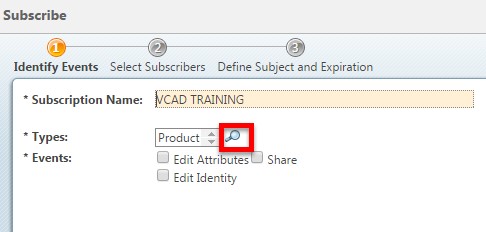
Image 1.jpg

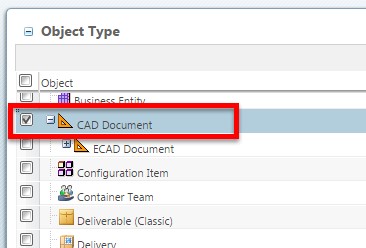
  • Select CAD Document and click OK.

Image 2.jpg

  • Select event type Publish Unsuccessful and Life Cycle states All.
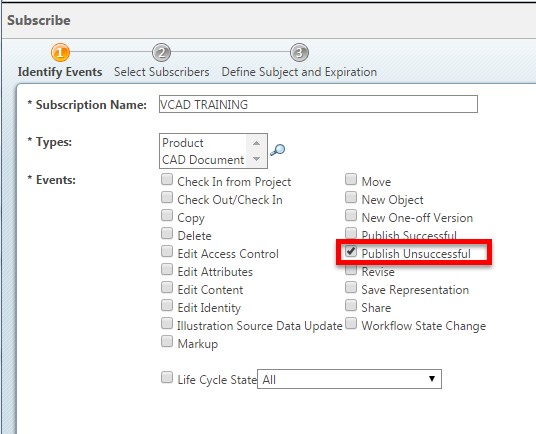
Image 3.jpg

  • Setup the rest of the subscription as usual. I have my notification delivered according to schedule to avoid being bombarded with emails!!

3 replies

16-Pearl
December 21, 2015

This is impressive Tim and thanks for posting.  I've been using subscriptions to nofity on failed publishes for a while now, but it has only been on specific dataset from the search results table.  I'll be curious to know if you have any performance issues. 

tdraper1-VisitorAuthor
1-Visitor
December 21, 2015

Hi Bill,

Thanks for the reply. It's early days but so far there has been no noticeable hit on performance. The net effect is no more than any other subscription, which in my opinion is negligible. I guess it would however be sensible to minimise the number of subscriptions on entire product contexts, and I would strongly suggest scheduling the email (otherwise you could get hundreds of emails if you are not at hand to deal with it when it goes down).

I will post on this thread more details the next time we get a major CAD Worker outage. I'll give you more feedback on performance then.

Tim

21-Topaz I
December 21, 2015

This is nice but I have one question.

Since it notifies you of failed jobs only then it's assumed the job has started.  But if the CAD worker is down on the server side the job won't start in the first place.  Which means there is no successful OR failed job and therefore you will not be notified.  Am I correct in this or will it still send an email notification?  If the CAD worker is down then the job is held in the queue and is set as Ready.

tdraper1-VisitorAuthor
1-Visitor
December 21, 2015

Hi Steve,

No it will still send you a notification. The WVS has no knowledge of the CAD Worker status and will not hold the the job in a Ready state. The job will still be submitted and then when it calls the CAD Worker to load the file it will report that no active worker could be found. I have tested this and it is 100% reliable.

Tim

3-Newcomer
October 11, 2022

Hi Tim,

We also implemented notifications through the ACLs and we got the notifications.


But we are getting messages in the email summary as (VISUALIZATION PUBLISH NOT SUCCESSFUL event on wt.doc.WTDocument) and the below table is the body of the email.

Target Identity:

Specification - TF-02146, Zenoli**, 2.1

Target Name:

Zenol***

Event:

VISUALIZATION PUBLISH NOT SUCCESSFUL

we have to change the summary of the email to the object name and number as per the Target Identity field can you see the above table.

Can you please provide the steps to how to get that result in the summary?

Thanks,

Ravi.

.