

17-Peridot
January 31, 2025
Solved

CAD Worker - Publishing issue

  • January 31, 2025
  • 2 replies
  • 1423 views

Hi Guys,

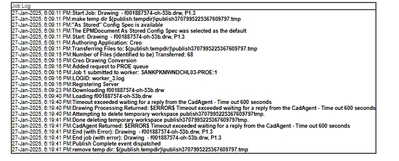
For some of the big assemblies and drawings that I tried to publish through Creo, I got a time-out issue.

How we can publish big assemblies & drawings through the CAD Worker Server without a Graphic card or Can we use a Thumbnail to publish this?
Amirtharaj_K_0-1738308551068.png

Regards,

AJ


Best answer by BenLoosli

If the assembly took 25 minutes, you can lower the timeout to 1800 (30 minutes) but leaving it higher will not affect your processing times. The system will only take as much time as it needs for each job. The timeout is to prevent the system to spending too much time on any one job.

The only method to getting higher throughput of your publishing is to run multiple servers or just multiple queues on the same server. Since my servers are up 24/7, I only run 1 queue and let them stack up if there is a long publishing job. By the next morning, they are all cleared.

2 replies

avillanueva
23-Emerald I
23-Emerald I
January 31, 2025

The time outs are totally adjustable. You want to set them to a reasonable amount to allow most all to successfully publish without clogging the whole queue.  68 files and taking 600 seconds seems a bit long so you might want to see what's up with that drawing and get it to come up better. It did not even successfully load. You can also add more workers and resources to your CAD Worker. Thumbnails are just images but they come from a successful publish job. If you have truly large assemblies, you can tag them not to publish or publish as a position assembly which is really fast. The wvs.properties file is where you need to look for timeouts. 

23-Emerald III
January 31, 2025

These are my settings for publishing:

Publish.cadtimeout.assemblies 3600

Publish.cadtimeout.component 600

Publish.cadimeout.drawing 1200


17-Peridot
February 1, 2025

@avillanueva @BenLoosli thanks for the reply.


@BenLoosli , it's working after I increased it to 3600, the same as the assembly CAD worker successfully published. But the only problem it's took 25 min to finish it's just one assembly at the same time more than 50 assemblies in the publishing queue.


Is there another way that we can use it here?


Regards,

Aj


BenLoosli23-Emerald IIIAnswer
23-Emerald III
February 3, 2025

If the assembly took 25 minutes, you can lower the timeout to 1800 (30 minutes) but leaving it higher will not affect your processing times. The system will only take as much time as it needs for each job. The timeout is to prevent the system to spending too much time on any one job.

The only method to getting higher throughput of your publishing is to run multiple servers or just multiple queues on the same server. Since my servers are up 24/7, I only run 1 queue and let them stack up if there is a long publishing job. By the next morning, they are all cleared.