12-Amethyst
August 15, 2023
Solved

Can't remove nested attribute group from search criteria windchill

  • August 15, 2023
  • 4 replies
  • 1295 views

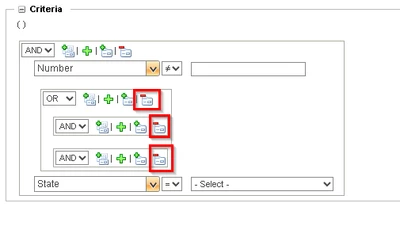
According the Windchill help center I should be able to remove nested attribute groups from a search, but the button does not register anything:
Alexander_Bgrd_0-1692112144494.png

How can this be solved?


Best answer by HelesicPetr

Hello @Alexander_Bgrd 


Check if the behavior is reproducible in all browsers or just in specific one. 

I would check a browser security configuration.

The browser can block javascripts from the page. 

Add the windchill address to the trusted sites 


check if some browser's addons can not case the behavior. 


PetrH


4 replies

jbailey
18-Opal
August 15, 2023

Is this in a standard browser window, or a Creo/WGM integrated browser? Some oddness with the Windchill UI if it is in the internal browser.


If it is not internal browser, does it happen in every browser type?

12-Amethyst
August 16, 2023

Hi,


It happened yesterday in WWGM and in Microsoft Edge, however when trying again this morning there were no issues anymore and the attribute group was removed.


No idea what happened.

HelesicPetr
22-Sapphire II
August 16, 2023

HI @Alexander_Bgrd 

It could be a site/company IT security changes that could case it but IT correct it who know 😄 

PetrH

HelesicPetr
22-Sapphire II
August 16, 2023

Hello @Alexander_Bgrd 


Check if the behavior is reproducible in all browsers or just in specific one. 

I would check a browser security configuration.

The browser can block javascripts from the page. 

Add the windchill address to the trusted sites 


check if some browser's addons can not case the behavior. 


PetrH

