12-Amethyst
June 29, 2015
Solved

Can the windchill "save as" feature be done offline and include drawing files?

  • June 29, 2015
  • 1 reply
  • 5459 views

I need to perform a "save as" operation on a large assembly, complete with multiple sets of drawings, assemblies, and sub-assemblies. I cannot do it while connected to WindChill due to errors with pre-existing file names (Intralink allowed an override but that feature is lost in WindChill).

I know that while working offline in CREO, I can rename a top level assembly with the File - Save As command and receive the prompt to rename the rest of the parts of the assembly. I need this command to work but include the drawing attached to the top level assembly. Performing a File - Save As command on a drawing only renames the drawing and does not change anything with the rest of the files.

I think CREO has the functionality to do this because the rename command will update everything in session and on the disk, but I do not know how to tell CREO to save the entire package to a new set of names.

Thank you for any input.
Best answer by JanSchmidt

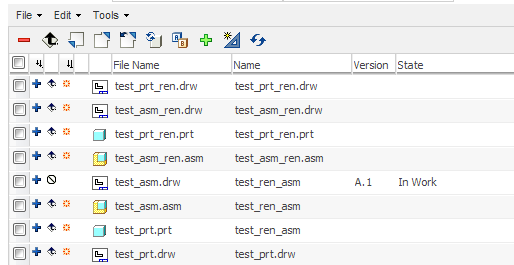
test_ren.png

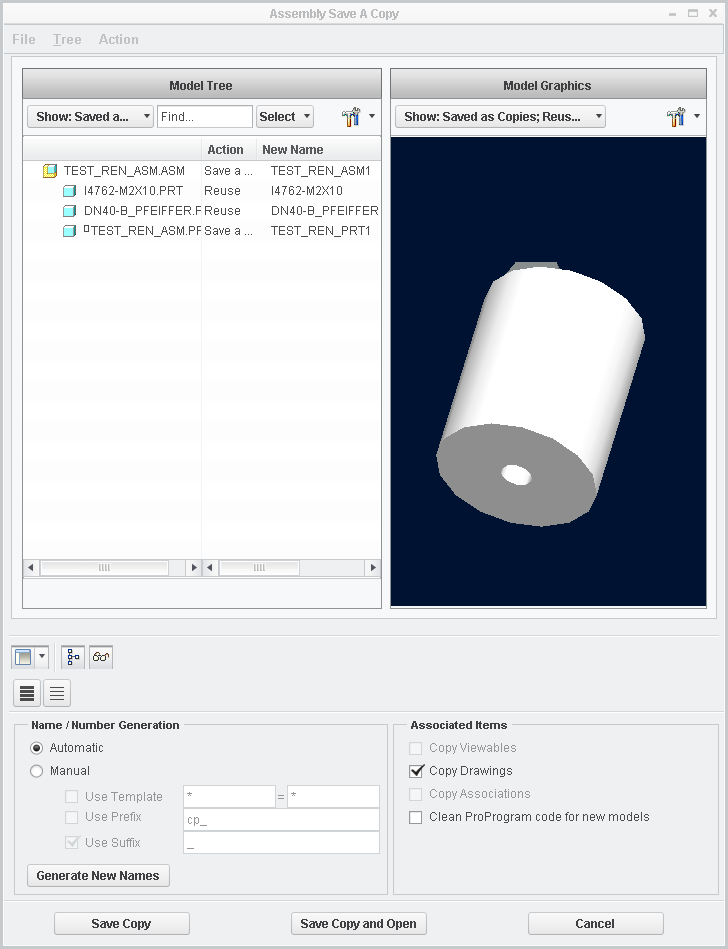
The *.asm/*.prt and their corresponding *.drw must have the same name. In the example I have created test_asm.asm and a drawing with the same name. Also I have created a part test_prt.prt and a drawing with the same name. Then I have # File #SaveAS #Save_a_Copy of the test_asm.asm to test_asm_ren.asm. In the "Save A Copy" dialog I also #Action #Save_a_Copy to the part. Creo copied the asm and the prt and their drawings to the new names. (In the following picture I added "1" to the names because I have taken it afterwards and it's just for illustration...)

save_a_copy.png

1 reply

1-Visitor
July 2, 2015

Have you set the config.pro option "rename_drawings_with_object both"? This should also copy the drawings to a new name when "saving as" from Creo.

Regards

Jan

12-Amethyst
July 6, 2015

Thanks Jan,

This seemed like exactly what I was looking for. I tried updating my config file, applying it, and performing the "save as" operation on the assembly (I did check the 'Copy Drawings' box as well) but Creo only renamed the assembly file. When I attempted the "save as" operation on the drawing, it only creates a duplicate of the original drawing without touching the models.

From what I can tell, updating that entry in the config file had no effect on the "save as" operation. Is there another option I need to update in my config file?

Matt P.

1-Visitor
July 6, 2015

test_ren.png

The *.asm/*.prt and their corresponding *.drw must have the same name. In the example I have created test_asm.asm and a drawing with the same name. Also I have created a part test_prt.prt and a drawing with the same name. Then I have # File #SaveAS #Save_a_Copy of the test_asm.asm to test_asm_ren.asm. In the "Save A Copy" dialog I also #Action #Save_a_Copy to the part. Creo copied the asm and the prt and their drawings to the new names. (In the following picture I added "1" to the names because I have taken it afterwards and it's just for illustration...)

save_a_copy.png