12-Amethyst
July 10, 2024
Question

Cascading Attributes not evaulated until a change is detected?

  • July 10, 2024
  • 2 replies
  • 703 views

Version: Windchill 11.2


Use Case: Limit the display of Calibration Types to Parts requiring Calibration.


Description:

I've set up two attributes, a boolean "Calibration' and a string "Calibration Type". The default value for "Calibration" is "No".

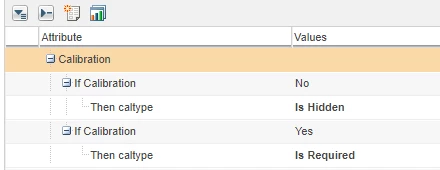
In the cascading attributes section, I have two rules. If calibration is no, hide calibration type. If calibration is yes, calibration type is required. (There is no "unhide" option).

In the edit page, this works, mostly. If the existing part is without the calibration attribute, it gets set to 'No" and no cal options are display. If I then change from no to yes, the edit page refreshes, and the cal type options appear.

BUT, if the existing part already has calibration set to yes, the initial load of the edit page shows 'Calibration YES" but the cal type is still hidden. Cal type doesn't appear unless the Calibration boolean is changed.


Part has existing "Yes" selected on Calibration Attribute shows:

shows.PNG


When it should show:

shouldshow.PNG


Cascading attributes config:

cascading.PNG


I must be missing something.


TIA,

=Don=

2 replies

16-Pearl
July 12, 2024

Does it make any difference if you re-order the rules?

Another issue I found is if a calibration type has been picked the value stays set when calibration is set to No.

Catalina
Community Moderator
July 16, 2024

Hi @DonKrause,


I wanted to see if you got the help you needed.


If so, please mark the appropriate reply as the Accepted Solution. It will help other members who may have the same question.
Please note that industry experts also review the replies and may eventually accept one of them as solution on your behalf.
Of course, if you have more to share on your issue, please pursue the conversation.

Thanks,


Catalina | PTC Community Moderator
17-Peridot
October 3, 2025

@DonKrause 


Can confirm this behavior in Windchill 13.0.2.1 as well. 

If I have a cascading attribute set like this:

Dobi_0-1759464774581.png


And set a default value of, say, Engine - I'd expect that the default view in the part layout would show the facility subsystem attribute hidden. 

Instead, both fields show:

Dobi_1-1759464902826.png


The correct cascading effect only works when I click any other option within the first attribute and then reselect Engine.