

14-Alexandrite
July 30, 2025
Solved

Change associate default part subtype

  • July 30, 2025
  • 1 reply
  • 258 views

Version: Windchill 12.1


Use Case: When checking in new objects into windchill


Description:

I am trying to check in a large number (>1000) objects into windchill from Creo.  When I upload and associate the parts it defaults to "Part". I cannot see a way to change this in any settings or preferences and it looks like the table requires each object to be editing manually. These parts are being used with WNC bridge so they MUST be an "Electrical Part". Any ideas how to do this?
Best answer by shussaini

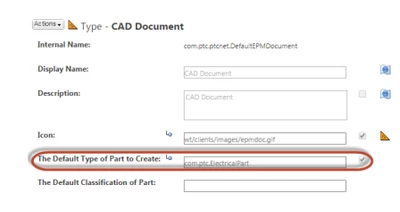
You will have to update the below field in Type and attribute manager. Refer this article.

shussaini_0-1753899459069.png

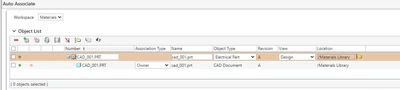
It will then reflect accordingly.

shussaini_1-1753899541136.png

Hope this helps.


regards

~Syed


1 reply

shussaini16-PearlAnswer
16-Pearl
July 30, 2025

You will have to update the below field in Type and attribute manager. Refer this article.

shussaini_0-1753899459069.png

It will then reflect accordingly.

shussaini_1-1753899541136.png

Hope this helps.


regards

~Syed