8-Gravel
July 11, 2023
Solved

Change Notice number in Part structure

  • July 11, 2023
  • 3 replies
  • 3479 views

Hello all,


We would like to show the name of a Change Notice in the Part structure. Right now it is showing that a "pending change exists" in the column "change status" but it would be very helpful if the name of the CN can be shown in another column. 


Can this be done?


Best regards!

Dennis Varkevisser


Best answer by jbailey

This can be done with Alias Attributes.

https://support.ptc.com/help/wnc/r12.1.0.0/en/index.html#page/Windchill_Help_Center/typeattr/TypeMgrAttrAliasMap.html for support...


in this example, I created Alias Attributes on my document type (you would have to do this for each type you wanted the attribute to show for)

jbailey_0-1689121456120.png


Create the attribute on the object type to map the name, number etc... then select alias as the type .


The mapping I used for Name and Number respectively looked like this

theChangeable2@wt.change2.ChangeRecord2~theChangeActivity2^wt.change2.WTChangeActivity2~theChangeActivity2@wt.change2.IncludedIn2~theChangeOrder2^wt.change2.WTChangeOrder2~name

theChangeable2@wt.change2.ChangeRecord2~theChangeActivity2^wt.change2.WTChangeActivity2~theChangeActivity2@wt.change2.IncludedIn2~theChangeOrder2^wt.change2.WTChangeOrder2~number


This would return the name and number of the CN for an object that is on the affected objects table of the CN

Then simply add the attribute column to the table view.


Additionally, if you wanted it to show up on an information page... Edit the layout for the type and viola
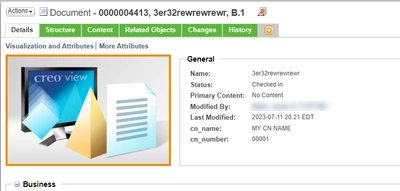
jbailey_1-1689121594527.png


Note, alias attributes are not searchable... It loads the objects and then "calculates" the value based on the relation... display only,...,



3 replies

avillanueva
23-Emerald I
23-Emerald I
July 11, 2023

Yes, via a Data Utility but consider that an item can be on many changes at the same time. Your business rules might only allow 1 CN but its possible none the less. Use jcaDebug to determine which Data Utility controls that pending changes column and you can overwrite to display the CN name instead.

8-Gravel
July 11, 2023

Hello Antonio, 


Thanks for your reply! Can you give us some additional information on how to use jcaDebug to determine which Data Utility is controlling the Changes column?


Best regards,

Dennis Varkevisser

avillanueva
23-Emerald I
23-Emerald I
July 11, 2023

You can add "&jcaDebug=true" which shows little ladybug icons all over interface. hovering over these can provide information you need. For your case, it did not work in the structure browser but I was able to do the same with one of the reports like single level BOM report. I added that change status column, copied the URL of the report and pasted into new tab which allowed me to add the jcaDebug attribute. 

https://<hostname>/Windchill/ptc1/part/reports/dispatcherSingleLevelBOM?wizardActionMethod=&AjaxEnabled=component&portlet=poppedup&oid=wt.part.WTPart%3A1659981834&ContainerOid=OR%3Awt.pdmlink.PDMLinkProduct%3A1029361821&actionName=SingleLevelBOM&action=SingleLevelBOM&ncId=-9045877829101336772&moduleName=com.ptc.windchill.enterprise.part.psb.PSB&rootOid=OR%3Awt.part.WTPart%3A1660883912&unique_page_number=58269935489488_0&actionName=SingleLevelBOM&jcaDebug=true

avillanueva_0-1689087229707.png

avillanueva_1-1689087240742.png


jbailey
jbailey18-OpalAnswer
18-Opal
July 12, 2023

This can be done with Alias Attributes.

https://support.ptc.com/help/wnc/r12.1.0.0/en/index.html#page/Windchill_Help_Center/typeattr/TypeMgrAttrAliasMap.html for support...


in this example, I created Alias Attributes on my document type (you would have to do this for each type you wanted the attribute to show for)

jbailey_0-1689121456120.png


Create the attribute on the object type to map the name, number etc... then select alias as the type .


The mapping I used for Name and Number respectively looked like this

theChangeable2@wt.change2.ChangeRecord2~theChangeActivity2^wt.change2.WTChangeActivity2~theChangeActivity2@wt.change2.IncludedIn2~theChangeOrder2^wt.change2.WTChangeOrder2~name

theChangeable2@wt.change2.ChangeRecord2~theChangeActivity2^wt.change2.WTChangeActivity2~theChangeActivity2@wt.change2.IncludedIn2~theChangeOrder2^wt.change2.WTChangeOrder2~number


This would return the name and number of the CN for an object that is on the affected objects table of the CN

Then simply add the attribute column to the table view.


Additionally, if you wanted it to show up on an information page... Edit the layout for the type and viola

jbailey_1-1689121594527.png


Note, alias attributes are not searchable... It loads the objects and then "calculates" the value based on the relation... display only,...,



HelesicPetr
22-Sapphire II
22-Sapphire II
July 12, 2023

Hi @jbailey 

I wanted to write a same idea with an alias >D you were faster 😄

PetrH

18-Opal
July 12, 2023

@Dennis_V_NL 


I got this working with the Change Status column.

In the column I display all Change objects that are currently open. including Problem Report, Change Request and Change Notice.

In my example below there is one Problem Report and one Change Request but it will display all change objects.

The example is just an example.


I see you're going with an attribute.  That's a much easier solution but the initial request was a better challenge, so I thought I'd figure it out.😀


d_graham_0-1689173482989.png


jbailey
18-Opal
July 12, 2023

How do you get Change Status to show the identities, not just the indicator? Also, does that affect the indicator on the info page?

HelesicPetr
22-Sapphire II
22-Sapphire II
July 12, 2023

Hi @jbailey 

@d_graham said that he use own attribute, so I am sure he just use own dataUtility to show what he really wanted. So it is customization with coding.

In this solution you can do what ever you want. 

PetrH