

1-Visitor
October 9, 2019
Question

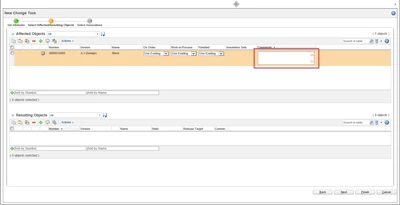
Change Task: Affected Objects Table: Comments one line only.

  • October 9, 2019
  • 2 replies
  • 1593 views

Hello there,


when creating a change task the affected object tables are getting quite confusing when adding several objects due to the fact that the comments attribute is shown with several lines. See screenshot attached.


Does anyone know how to reduce the comments field to one line?


I tried to customize the table views, searched the type and attribute manager for layouts or input style methods but did not succeed so far...


Thanks in advance for your help!


Best regards

Chris
 

clipboard_image_0.png

2 replies

1-Visitor
October 9, 2019

@Chris17 

I prefer it to be multiple lines, but the way I achieve that is to use Wrap Text in the columns.  Perhaps your column is set to Wrap Text?  You can look here and deselect it if you like.

wrap.png

James

Windchill 11.0

Chris171-VisitorAuthor
1-Visitor
October 10, 2019

Hi James,


thanks for your quick reply. The wrap text/unwrap text option does not change anything. At least not the size of the multiline input field for comments...


clipboard_image_0.png

Best regards

Chris

21-Topaz I
October 10, 2019

The wrap text is for the cells within the whole table.  Not that individual box.


You only want to show 1 line of text but still allow more lines to be added?  Or you want to allow only 1 line and without being allowed to add more text than what the box shows?

I know you can change the amount of characters several different boxes can have.  We increased the amount of characters in the Resulting Objects Comments field from the default to 4,000.  But that's done on the server.  Our partner company did that for us.