
4-Participant
May 6, 2026
Solved

Changing Windchill Visualization Orientation

  • May 6, 2026
  • 1 reply
  • 28 views

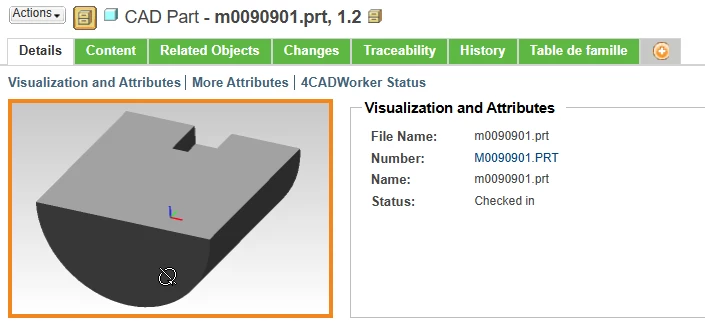
 Hey all! In Creo, we have a default Coordinate System as shown in the image that is viewed as Creo’s Standard Orientation (I believe is Trimetric). However, when I Windchill’s visualization viewer, it looks like it imposes a different coordinate system (Y and Z are switched) in Windchill. Does anyone know of any tricks to align these views?

Currently all of our thumbnail views are being shown from the bottom on all parts which isn’t as helpful as it should be! Currently running Windchill 12.0.2/Creo Parametric 10.0. Thank you!
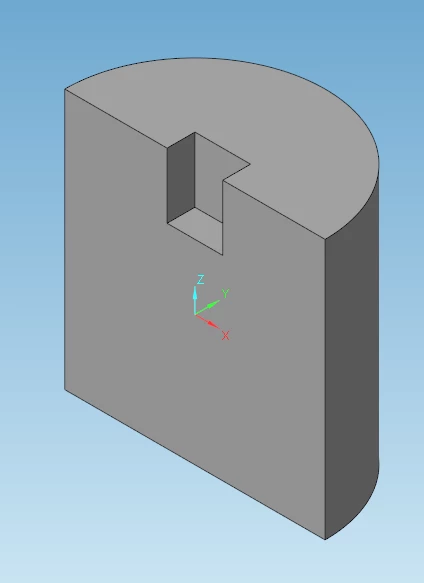
 

Creo Standard Orientation
Windchill Visualization Standard Orientation


Best answer by TomU

Try setting these properties in Windchill.  Windchill service restart is required for them to take effect.

xconfmanager -s thumbnail.generator.rx=52 -t /codebase/WEB-INF/conf/wvs.properties
xconfmanager -s thumbnail.generator.ry=-23 -t /codebase/WEB-INF/conf/wvs.properties
xconfmanager -s thumbnail.generator.rz=0 -t /codebase/WEB-INF/conf/wvs.properties

https://www.ptc.com/en/support/article/CS68609

https://www.ptc.com/en/support/article/CS100785

1 reply

TomU23-Emerald IVAnswer
23-Emerald IV
May 6, 2026

Try setting these properties in Windchill.  Windchill service restart is required for them to take effect.

xconfmanager -s thumbnail.generator.rx=52 -t /codebase/WEB-INF/conf/wvs.properties
xconfmanager -s thumbnail.generator.ry=-23 -t /codebase/WEB-INF/conf/wvs.properties
xconfmanager -s thumbnail.generator.rz=0 -t /codebase/WEB-INF/conf/wvs.properties

https://www.ptc.com/en/support/article/CS68609

https://www.ptc.com/en/support/article/CS100785

Corey1154-ParticipantAuthor
4-Participant
May 7, 2026

Thank you Tom! That worked perfectly