
1-Visitor
March 15, 2022
Solved

Check in of EPM document to fail in workspace if File name contains any string.

  • March 15, 2022
  • 1 reply
  • 1395 views

Hi All,

I'm trying to import a local file epm document in workspace and check-in in windchill.

I'll be creating associated WTPart in process.

The epm document number will be same as file name of epm document.

The requirement is epm document number should be only numeric.

If epm document file name contains any string it shouldn't check-in or throw a error " file name should be numeric"

Any ideas how it could be achieved.

I'm thinking of business rules.

Thank  you in advance.


Regards,

durga
 

Best answer by rhart

A business rule could be written the validate the part number but business rules require a workflow.

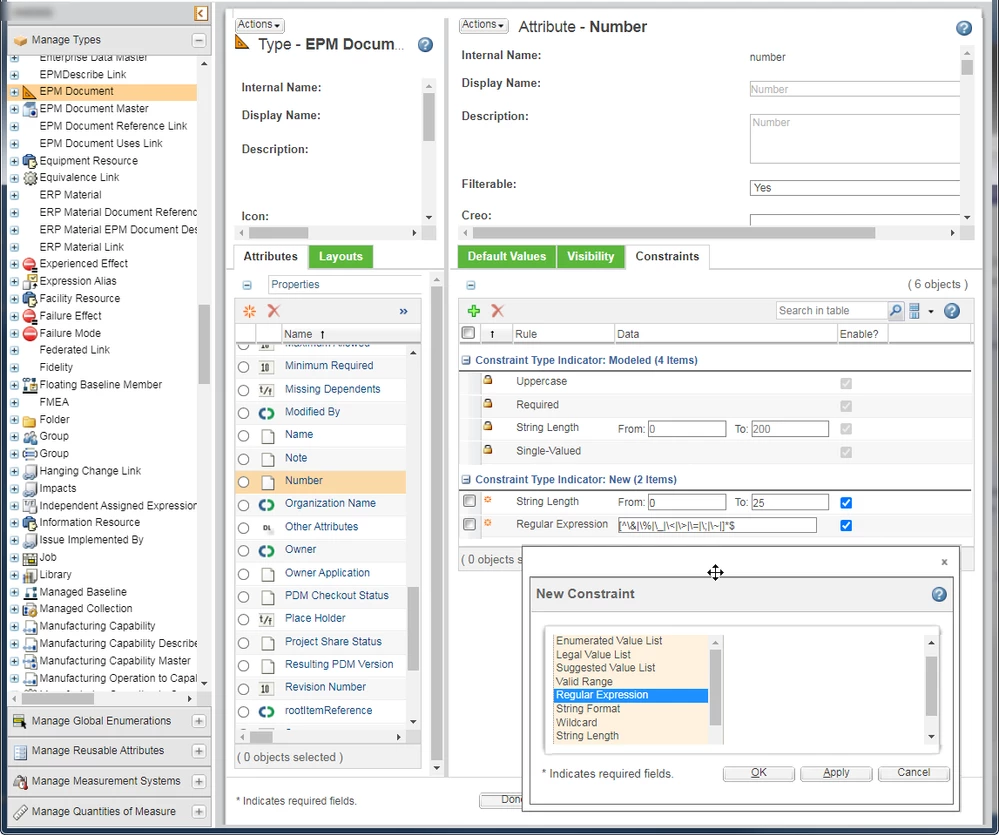
Perhaps another simple way is to use a regex constraint, I added this regex to stop special characters ( & % _ < > + ; ~ ) in the WTPart/CAD Number.

Something like [\d]*$ only digits \d are allowed.

Or [^A-Z]*$ the letters A to Z are not ^ allowed.


reg_ex.png

1 reply

rhart16-PearlAnswer
16-Pearl
March 15, 2022

A business rule could be written the validate the part number but business rules require a workflow.

Perhaps another simple way is to use a regex constraint, I added this regex to stop special characters ( & % _ < > + ; ~ ) in the WTPart/CAD Number.

Something like [\d]*$ only digits \d are allowed.

Or [^A-Z]*$ the letters A to Z are not ^ allowed.


reg_ex.png

Durga1-VisitorAuthor
1-Visitor
March 29, 2022

thanks a lot hart