

14-Alexandrite
June 27, 2025
Solved

Classification Explorer - I cannot select a node that has a subnode (it children)

  • June 27, 2025
  • 1 reply
  • 366 views

- Raw Materials

  •  Aluminium (24 in total)
    • Aluminium Dimension (18)

Cannot select directly the node Aluminium (18 wtparts). But I can select the subnode Aluminium Dimension and go to the Wtparts classification results from this subnode. 

For the Aluminium node (the parent), the only way i could get access to thoses 18 wtparts plus the 18 of aluminium Dimension , was to select select Search button near of Hide Image.


Is there another way to select this node directly ? Why do I need to do an extra click to get access of thoses wtparts classified in Parent node?
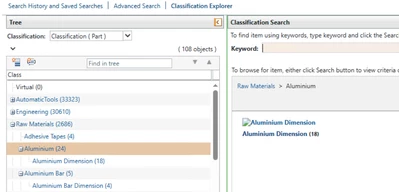
2025-06-27_15h44_59.png

Best answer by MarianaSousa

Yes, the only way i could select the parent was in that way. I was wondering if theres any preferences or even in the Manage Classification, that we could just set it from selecting directly, and not using that Search in the right corner

1 reply

avillanueva
23-Emerald I
23-Emerald I
June 27, 2025

I think the system is waiting until you get to the end to display results. In the video you were on the Aluminum node but there was a child node still below. If you want to stop at a parent node, I think you need to click "search" on the right hand side, where is shows the images and child nodes. That tells it to bring all items up. In effect, you have the same thing since it did not look like you had classified parts at the parent node. 

MarianaSousa14-AlexandriteAuthorAnswer
14-Alexandrite
June 27, 2025

Yes, the only way i could select the parent was in that way. I was wondering if theres any preferences or even in the Manage Classification, that we could just set it from selecting directly, and not using that Search in the right corner