Hello Davidas
When you remove objects from the work-space ,only the link will removed from the work space and not the meta data
These files are stored in the cache folder location ,usually it will be in C:\Users\*username*\AppData\Roaming\PTC\ProENGINEER\Wildfire\.wf\Creo 2.0\Parametric\.cache2008\.cache2008\*server name*
Note: *username* and *server name* is variable depending on your system
in side the server name folder oyu will find two types of files ie .lid and .sid , .lid files represent new or modified files in your local cache that have not been uploaded to the server. and “sid” files in the local cache represent files that have already been uploaded to the server, (it is usually unnecessary to attempt recovery of these files)
You can delete the cache in 2 methods
1.By deletion the files in the folder (*server name*)
I don't recommend this , because it it delete all the files from all your work space
2. from Creo 2 Go to File>manage-session>Server management>click on cache tools
Select the work space that you want to clear and clink on OK (Refer the attached screenshot)
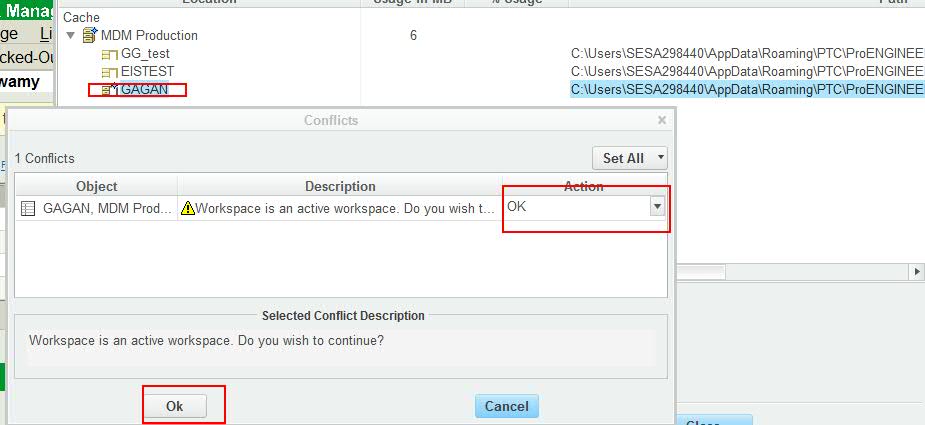
Important Note:make sure there are no locally modified files are new files in the work space , because you may loose the data.
@Eric Metzger
I guess if accumulated cache size is very huge ,say around 18-20 GB , they may face slowness issue in the work space .what is your opinion on this ?
@devias Pawar
Even i am into the admin side , I agree eric's point , if you are looking for delete the .wf files , can we know what is the reason ?
Best Regards

