

10-Marble
March 25, 2025
Solved

Compliance with ASME requirements of Revision History Table and Approval Indicator

  • March 25, 2025
  • 2 replies
  • 1053 views

Version: Windchill 12.1


Use Case: per ASME Y14.35, Section 6.1.5 the "APPROVED" column of the Revision History table is defined as: "Authorized signature(s), name, or approval indicator, as required, shall be entered to indicate approval of the change(s) made to the drawing." When working offline with paper copy, this was traditionally a signature by the engineer reviewing the drawing to signify it had been approved. While working within a PDM system however, the approval is done electronically through a Windchill Workflow, and so this field has a disconnect. Windchill locks the state of the drawing after the engineer approves it, but in order to add the signature of the engineer to the drawing it would have to be modified post approval - which is not allowed by users but if done automatically through a workflow would be acceptable. What my company would like to do is to have is the live and automatic linking of the "approval indicator" (does not need to be a signature or name, could be nearly anything indicating it has been approved) on the published drawing after the ECA of "Approve Drawing" has completed.


Description:

Compliance with the ASME standard while in a Windchill environment seems difficult to manage. We need to show approval on the field of the drawing, but can not modify a drawing once approved as that runs counter intuitive to the review process.

How do we get an indicator to appear in the revision history table automatically upon the Change Management Workflow task completion?

Best answer by Chris3

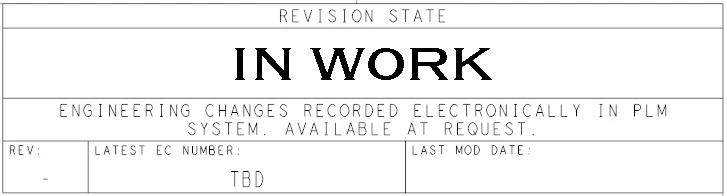
This is what we do:
Screenshot 2025-03-25 144040.png

EC Number is still manually added by the engineer.
Other cells use:
PTC_WM_LIFECYCLE_STATE

PTC_WM_REVISION

PTC_WM_MODIFIED_ON


We have date_type_parameter_format set to %mm-%dd-%yyyy
https://www.ptc.com/en/support/article/CS49539

2 replies

HelesicPetr
22-Sapphire II
22-Sapphire II
March 25, 2025

Hello @JDiluzioQinetiQ 

You can add the lifecycle state to the drawing table to indicate that the drawing has been approved.

I did some customization in the workflow that also write the approval information name of approval to the drawing attribute post-approval process without iteration. The attribute was used in the drawing table so information was there. 

That was enough because new drawing representation contains that new information. 


PetrH

10-Marble
March 25, 2025

We used to put the lifecycle state on the field of the drawing, but this conflicts with other priorities from our configuration management team so now I am looking for more that second option you mentioned.

Do you have any specifics you would not mind sharing with how you customized it so that I can share with my org and try and implement?  I am not sure how to get the hook for the 'approval information name of approval' to appear on the object being approved.

Chris3
Chris321-Topaz IAnswer
21-Topaz I
March 25, 2025

This is what we do:
Screenshot 2025-03-25 144040.png

EC Number is still manually added by the engineer.
Other cells use:
PTC_WM_LIFECYCLE_STATE

PTC_WM_REVISION

PTC_WM_MODIFIED_ON


We have date_type_parameter_format set to %mm-%dd-%yyyy
https://www.ptc.com/en/support/article/CS49539

10-Marble
April 14, 2025

Apparently this is OOTB functionality as of 12.1.2.0, but my Windchill admin and I must have missed it in the documentation. Still digging, but looks promising (if it works as flawless as described)
https://community.ptc.com/t5/Windchill-Ideas/Add-Windchill-parameters-for-latest-change-number-and-where-used/idc-p/1010548/highlight/true#M18831

JDiluzioQinetiQ_0-1744641388367.png


HelesicPetr
22-Sapphire II
22-Sapphire II
April 15, 2025

Hi @JDiluzioQinetiQ 

The attribute has to be added to the drawing table or somewhere on the drawing. 

The visualization has to be regenerated after approval (usually done by code in the workflow), and the visualization worker has to be configured to regenerate the drawing during the visualization process.

Then it should work. 


PetrH