17-Peridot
December 3, 2024
Solved

Customize Table

  • December 3, 2024
  • 1 reply
  • 543 views

Hi Guys,

Can we restrict multiple objects in the Windchill customize table? If I try to hide an instance, I can hide it. I want a folder structure also, but that automatically hides.
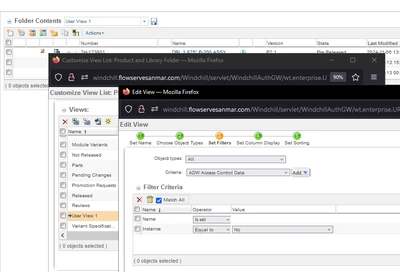
 

Amirtharaj_K_0-1733206527803.png


Regards,

Amir

Best answer by HelesicPetr

Hi @Amirtharaj_K 

It is simple.

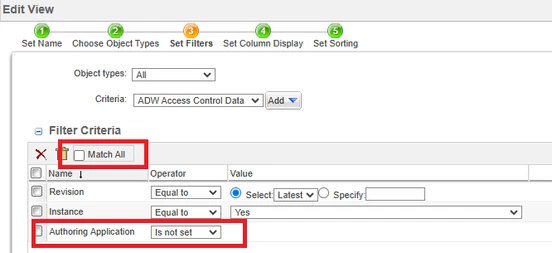
You have to specify OR condition. Not AND.

Also you have to find an attribute that can be used in the condition that shows just the folders. 


the best attribute is authoring application. All CAD Documents have the authoring application value  set but the folders do not.

So

HelesicPetr_1-1733215873730.png

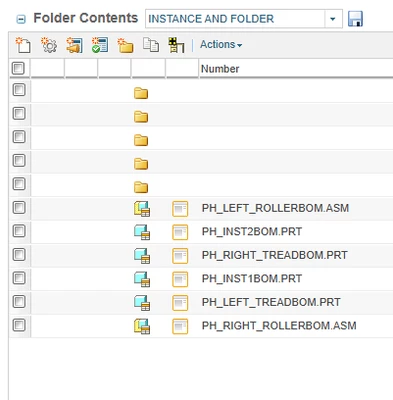
the folder result>

HelesicPetr_0-1733215810535.png

PetrH

1 reply

HelesicPetr
22-Sapphire II
22-Sapphire II
December 3, 2024

Hi @Amirtharaj_K 

It is simple.

You have to specify OR condition. Not AND.

Also you have to find an attribute that can be used in the condition that shows just the folders. 


the best attribute is authoring application. All CAD Documents have the authoring application value  set but the folders do not.

So

HelesicPetr_1-1733215873730.png

the folder result>

HelesicPetr_0-1733215810535.png

PetrH

17-Peridot
December 9, 2024

@HelesicPetrYou are really a lifesaver. Thanks for sharing your knowledge with me. It's functioning as you predicted.

Regards,

AJ