
3-Newcomer
January 24, 2018
Solved

delete old iteration

  • January 24, 2018
  • 2 replies
  • 4716 views

Hello everybody,

How delete old iteration ?

exemple : In Windchill we hawe A1 - A2 - A3 - A4, I want delete version A1 - A2 - A3 and keep A4 version.

in windchill 10 with right click on the document there was "delete old iteration" but in windchill 11 this function has disappeared

and with fonctionne delete, he propose me :

1. Delete all iterations of each object

2. Delete all revisions of each object

3. Delete latest iterations of each object


Sorry for my english, and thanks
Best answer by BrianToussaint

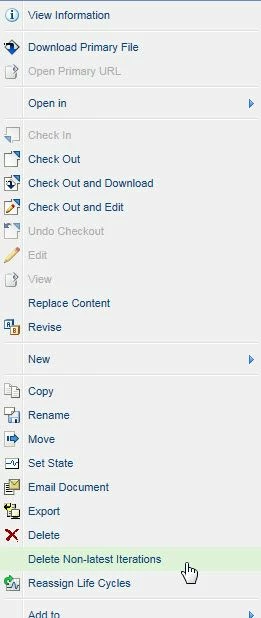
"Delete Non-latest Iterations" is on my Windchill 11.  The screenshot below is from doing a right click on a searched document.  Does the user have Delete privileges?  Are there iterations of the object in question?

1-24-2018 7-36-31 AM.jpg

2 replies

19-Tanzanite
January 24, 2018

"Delete Non-latest Iterations" is on my Windchill 11.  The screenshot below is from doing a right click on a searched document.  Does the user have Delete privileges?  Are there iterations of the object in question?

1-24-2018 7-36-31 AM.jpg

3-Newcomer
January 24, 2018

I just saw that we have this message with right click "Delete Non-latest Iterations" with certain fil types (.dwg .tiff) we don't use article in windchill...

but with creo elements (creo 3D and drawing) this function isn't available...

16-Pearl
January 24, 2018
One work around is to use "purge" which, unfortunately, is only a site or org level utility, but it will do exactly what you are looking to do. Regards, Dan N.
3-Newcomer
January 24, 2018

Hi Dan, thanks for your reponse, yes it's exactly that, we use purge when we work with windows, we can use it with winddchill?

16-Pearl
January 24, 2018

Yes, you can purge in Windchill.  It's a utility under the site and org, so if you have site and/or org access, you should be able to run the purge utility.


Regards,

Dan N.