

13-Aquamarine
August 4, 2021
Solved

Delete the contents of a Workspace in Windchill automatically

  • August 4, 2021
  • 1 reply
  • 3187 views

Hi,


In short:

I'm looking for a way to clear the contents of a Workspace and the cache automatically, without user intervention.


Long story:

We've got a server that's running a Creo 7.0.x.0 installation for conversion from prt/asm to stp.
We can't use a worker for this as we've got a third party software involved.


The Creo session is started using a batch-file, so adding an "rmdir \..\..\.cache2008" command is trivial for clearing the cache as we see fit, if we don't want to use the dm_cache_limit setting (which we don't).


However, the Workspace is still just adding more and more new items as it's downloading, and around some GB or 20k files, it's slowed down the task a lot. Manually logging onto the server is a way to do it, but not ideal.
So, this is done from the Windchill side apparently, and that would involve prorgamming something beyond DOS probably.


Anyone with an idea?
Best answer by d_graham

Zoli, hi


Maybe you could describe the big picture?

For example how do you know it’s time to generate a stp file and run it through the third party tool?


Are you working off a list of numbers thus a bulk stp creation?

Are you doing this when the objects state is set to whatever?


Maybe you can supply details on your process?


That said, how do you know which WS to remove from?

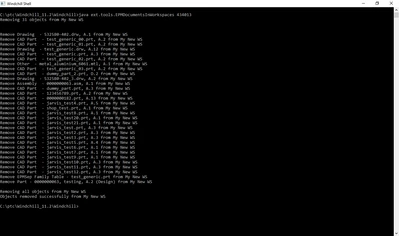
I wrote a utility that will remove all objects from workspace given the WS. It works great but if you don't want any user interaction there needs to be some logic to determine which WS to remove the objects from. 


The utility can be triggered anyway that's required. Below I ran it in a Windchill shell.

d_graham_0-1628195870674.png


David

1 reply

18-Opal
August 4, 2021

@Zoltán 


You can probably automatically run the stp files through your third party tool after they are created by a publishing job.

If running third party tool includes arguments for input file and output file this should be doable.


I have done this a few times with different file type.  In all cases the code gets the published file (stp, pdf, hpgl, whatever) from the Windchill vault; runs it through the third party tool; replaces the original file in the Windchill vault with the output file from the third party tool. Or adds the output file as new content.

If the output files need to be moved/copied to a location outside of Windchill that too can be part of the automation.

In all cases the code is triggered to run automatically. No user input is required.


That doesn't answer the remove for WS question which is also doable but if the only reason you are not getting the stp files from a publishing job is due to the requirement to run them through the third party tool I would think that's the problem that needs to be addressed? True?


David

Zoltán13-AquamarineAuthor
13-Aquamarine
August 5, 2021

Hi David,

That is one way of getting around the problem, I'll discuss this with the team.
Thanks.

d_graham18-OpalAnswer
18-Opal
August 5, 2021

Zoli, hi


Maybe you could describe the big picture?

For example how do you know it’s time to generate a stp file and run it through the third party tool?


Are you working off a list of numbers thus a bulk stp creation?

Are you doing this when the objects state is set to whatever?


Maybe you can supply details on your process?


That said, how do you know which WS to remove from?

I wrote a utility that will remove all objects from workspace given the WS. It works great but if you don't want any user interaction there needs to be some logic to determine which WS to remove the objects from. 


The utility can be triggered anyway that's required. Below I ran it in a Windchill shell.

d_graham_0-1628195870674.png


David