
1-Visitor
May 11, 2017
Question

Deleting an attribute

  • May 11, 2017
  • 8 replies
  • 4822 views

A bit over a year ago we hired a brilliant company to configure our Windchill to the workflows etc. that we wanted. One thing we wanted was to do was map our parameters in Creo to Attributes in Windchill, so we could use them to search. So they created a bunch of attributes called MFG1_PN, MFG2_PN, MFG3_PN, MFG4_PN, which are supposed to be Data Type = String. But they accidentally made MFG3_PN "Boolean" data type.


When I log in a Admin and go to "Manage Global Attributes" I get all the listing as expected. But I can't edit the type from Boolean to String. I get that. I read it in the Help, so I understand why you couldn't be able to do that, it's totally different types of information. So I thought I could delete it and create it again as String data type. But nope, won't let me. I get this message:
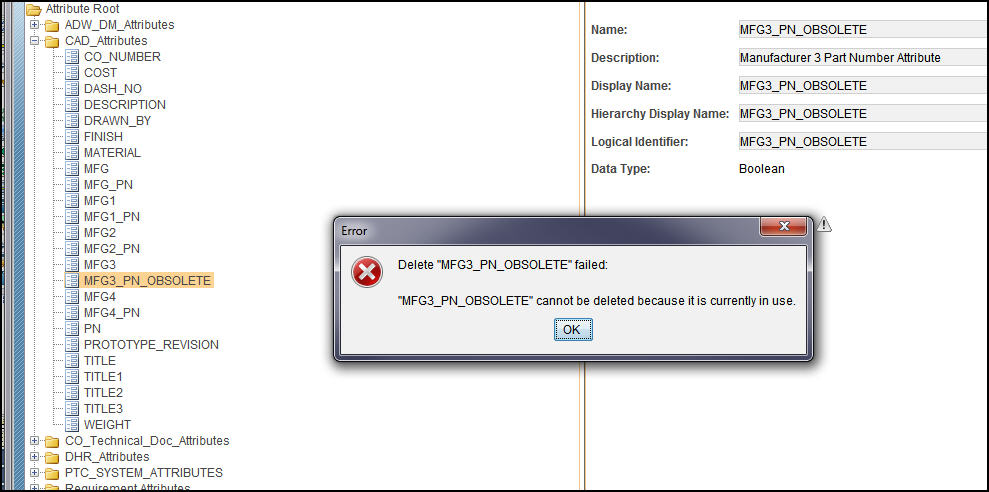
gward- 2017-05-11 13-51-49.jpg

(I should say I renamed it to "MFG3_PN_Obsolete", with the idea of creating a new attribute with the same name but String.)

Okay, what do I do? I believe there isn't a single Creo object in our database that has a value for this mapped parameter in it. The parameter is there, just empty. Some of our people have had trouble checking in objects because Boolean ain't a string. Even though the parameter is, as I said, empty.

8 replies

23-Emerald IV
May 11, 2017

Is this attribute still displayed on any layouts (pages)?  Maybe try this article: https://support.ptc.com/appserver/cs/view/solution.jsp?n=CS16435

1-Visitor
May 12, 2017

I don't know what a Layouts page is. I tried looking it up but I have no idea what they are talking about, sorry. FYI this 10.2.

23-Emerald III
May 12, 2017

The layout page is where the attribute is defined for filling in the information. You may not have one directly in use as these are Creo mapped attributes.
When you do a Promotion Request or a Change Request, the screens that you fill out are generated from the attribute layout information.

Tom's CS article has some good links to get into the layout information.

Your customizer may have included your mapped attributes on a layout page, or on a default page by the system, and will need to be removed from there before the attribute itself may be deleted.

Maybe someone can create some screen shots to show what is happening and how to get there. My system contains classified data and I cannot do it.

2-Explorer
May 15, 2017

From the screenshot, it looks like you are deleting a global attribute and the global attribute is used in mapped to one of the attributes assigned to a type. If you are trying to delete the attribute from a specific type say, wtdocument, navigate to that type from Type and Attribute Manager and search for the attribute from the list and delete it. Remember, this will delete the attribute and its values from all your existing objects.

Ptccommunity.PNG

1-Visitor
May 16, 2017

I think I got to the right place. See below:

gward- 2017-05-16 09-02-28.jpg

As you can see, "MFG3_PN" is a Boolean data type, hence that little t/f in the icon. I can't delete it though. I check the button, but the delete icon doesn't work.

2-Explorer
May 16, 2017

Yes, you are in the right place. Did you click on edit from Actions next to "Type- CAD Document" on the top. You have to toggle the selection in attribute table below for the java script to detect that you are in edit mode